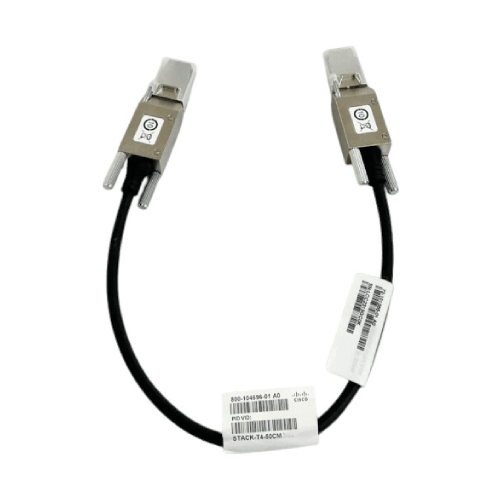

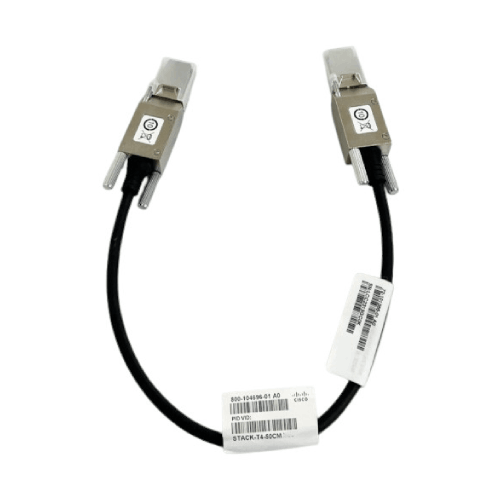
Cisco Stack-T4-50CM 4-Stacking Cable
Regular Price:৳25,000.00Availability: SKU: 6.99.27.9408
Quick Overview
-
Support
Saturday – Thursday: 09 AM - 06 PM. -
Payment
Cash on Delivery | Card | Online Payment -
Shipping Cost
Inside Dhaka 100tk | Outside Dhaka 150tk -
Warranty Policy
Read More
Description
Cisco Stack-T4-50CM 4-Stacking Cable in Bangladesh
The Cisco Stack-T4-50CM 4‑Stacking Cable is a purpose-built stacking cable used to interconnect compatible Cisco switches into a single logical unit. At just 50 cm in length, this cable is designed for short‑distance, in‑rack stacking, letting you place switches directly above or beside each other in the same rack and still benefit from StackWise/stacking capabilities.
In practical terms, when you stack Cisco switches using official Cisco stacking cables:
They share a single control plane and can be managed as one virtual switch,
You gain port aggregation across physical units—all ports become part of a single switching fabric,
Redundancy and resiliency are improved: if one stack member fails, others continue forwarding traffic.
In Bangladesh, where racks often house multiple Catalyst switches—for layer 2 access, layer 3 routing, or distribution roles—the Cisco Stack-T4-50CM helps you:
Create resilient switch stacks in a clean, compact way,
Minimise messy long cables between adjacent devices,
Maintain a supported, Cisco-approved stacking solution instead of improvising with third-party alternatives.
Why Use a 50cm Stacking Cable?
The 50 cm length (half a metre) is ideal when your stacked switches are:
Mounted directly on top of each other in the same rack,
Positioned side-by-side in a small rack where distance is minimal.
Compared to longer stacking cables:
50cm keeps your cabling:
Neat,
Easy to trace,
Less likely to sag or get caught in rack doors,
It helps maintain good airflow:
Less cable clutter in the front or rear of the rack,
Better cooling around devices—important in hot Bangladeshi conditions.
In many server/network rooms in Dhaka, Chattogram, Sylhet or Khulna, racks are tight and cabling can quickly become a spaghetti mess. Choosing short, correct‑length stacking cables like the Stack-T4-50CM makes life easier for network engineers and future maintenance.
4‑Stacking Cable – Designed for Stack‑Enabled Cisco Switches
The “4-Stacking Cable” designation refers to the cable being part of Cisco’s StackWise/StackT series cable family, used to link Stack‑enabled switches (check your exact switch model’s compatibility with Stack‑T4 cables).
When used on compatible Catalyst platforms:
It connects to StackWise/Stacking ports on the rear/front (depending on model) of the switch,
Helps form:
Ring or full mesh stack topologies with redundancy (if you chain multiple switches and complete the ring),
Single‑chassis behaviour across multiple physical devices.
Key benefits of stacking with official Cisco cables:
Single Point of Management:
Configure and monitor a stack as one switch, simplify operations,
Port and Resiliency Expansion:
Add more switches to the stack when you need extra ports,
If a single member fails, others in the stack keep your network up,
Consistent Behaviour:
Stacking is integral to many Cisco designs; using Cisco cables preserves expected performance.
In a large office or campus in Bangladesh:
Stacks of 2–4 switches in one rack can support entire floors or segments of the building,
Using the 50cm stacking cables among these co‑located switches is the cleanest setup.
Colour and Build – Black, Enterprise‑Grade
Your short spec lists:
Color: Black,
Cable Type: 4‑Stacking Cable.
What this means in real handling:
The cable has:
A robust jacket and standard Cisco stacking connectors at each end,
Connectors shaped to fit precisely into stacking ports—no guesswork.
The black colour helps:
Visually distinguish stacking cables from regular Ethernet or fibre patch leads (which are often blue, yellow, or aqua),
Quickly identify stack interconnects in a busy rack when you’re troubleshooting or re‑arranging equipment.
Indoor, In‑Rack Connectivity
Although the spec says “1 item network cable, length 50 cm,” this is not meant to be used for arbitrary patching; it’s a specific stacking interconnect:
Best used within the same rack or adjacent racks where stacking ports are close,
Strongly recommended to:
Follow Cisco design guidelines for stack topologies,
Avoid tight bending radii or physical strain on connectors.
In Bangladesh, where racks sometimes end up in less-than-ideal corners or small cabinets, always:
Arrange switches so stacking ports face each other conveniently,
Use the 50cm cable for those short, direct runs.
Real-World Use Cases in Bangladesh
Single Rack Catalyst Stack in Dhaka Office
An organisation has two or three Catalyst switches installed consecutively in a rack at HQ,
They use Stack-T4-50CM cables to:
Connect Switch 1 to Switch 2,
Connect Switch 2 to Switch 3,
Close the ring by connecting back as per Cisco’s recommended stacking pattern,
All switches behave as one big logical switch, simplifying configuration and upgrades.
Bank Branch Communications Rack
A bank branch has:
One core switch and one access/PoE switch in a small wall rack,
With the 50cm stacking cable, they form a simple 2‑member stack:
The branch network has redundancy between members,
Branch IT is easier to manage centrally as one logical device.
Small Datacentre / IDF Closet
In a mini data centre in Dhaka, multiple Catalyst switches serve:
Servers,
Storage,
Uplinks to distribution,
Stacking these with appropriate cables results in:
Redundancy within the rack,
Simpler Spanning Tree design,
Cleaner path for stacking roles like active/standby.
Compatibility & Deployment Notes
Before using the Cisco Stack-T4-50CM 4‑Stacking Cable, always:
Check your specific Cisco switch model’s documentation to:
Confirm Stack‑T4 cable compatibility,
Identify the recommended stacking topologies,
Understand maximum stack size and supported combinations.
Typical Catalyst families that may accept Stack‑T4 cables (subject to exact part numbers) include certain Catalyst 9300/9200 or others; you must verify:
Whether your version is StackWise-480, StackWise-1T, Stack‑T etc.,
Which cable type (Stack‑T1, Stack‑T4, older StackWise) is correct.
Using the wrong stacking cable or mixing incompatible types can lead to:
The stack not forming correctly,
Unsupported configurations,
Operational issues under load.
Maintenance & Best Practices
To keep stacking links healthy:
Avoid tight bends:
Respect minimum bend radius,
Don’t pinch or sharply kink the cable in cable managers,
Secure cables:
Use gentle Velcro ties or cable guides,
Ensure they are not strained by rack door closures,
Keep connectors clean:
Avoid dust and debris in stacking ports,
Insert connectors fully and lock them firmly.
Periodically, network engineers should:
Inspect stacking cables for:
Signs of wear,
Damage to connectors,
Loose connections,
Monitor stack health:
Use Cisco CLI/management tools to verify stack ring status and redundancy,
Ensure link errors on stacking ports are minimal.
✅ Key Features
Official Cisco 4‑Stacking Cable: Designed specifically for connecting compatible Cisco switches in a StackWise/Stack‑T environment.
Length 50 cm: Ideal for short, in‑rack connections between adjacent switches, keeping cabling neat.
Colour Black: Easily distinguish stacking links from standard patch leads.
Enterprise-Grade Connectors: Robust ends made for repeated insertions and secure connections to stacking ports.
Supports High-Speed Stack Fabric: Helps enable resilient, high-bandwidth backplane connectivity between stack members.
✅ Usage / Applications
Forming switch stacks in small network racks using Cisco Catalyst switches.
Connecting multiple switches in a single rack to act as one logical switch.
Implementing stack redundancy in branch office and campus core/aggregation racks.
Optimising cable management in network closets where stack members are physically close.
✅ Benefits of This Product?
Simplifies stacking cabling with the correct length for adjacent devices, reducing clutter.
Increases reliability by using genuine Cisco stacking cables engineered for the platform.
Supports high-performance, resilient switch architectures, where multiple switches work as one.
Helps maintain good airflow & rack hygiene, important in hot climates like Bangladesh.
✅ Ideal For
The Cisco Stack-T4-50CM 4‑Stacking Cable is ideal for:
Enterprises, banks and universities in Bangladesh that run stacks of Cisco Catalyst switches in the same rack,
System integrators building or expanding Cisco-based networks and needing the correct stacking cables for short interconnects,
Branch and campus network closets where 2–4 switches are mounted together and require clean stacking links,
Any Cisco customer who wants to maintain a supported, cleanly wired Catalyst stack rather than dealing with non‑genuine or incorrect cable lengths.
If you want your Catalyst stack to be both reliable and tidy, this is exactly the accessory you should be using.
✅ Why Choose the Cisco Stack-T4-50CM 4‑Stacking Cable?
You choose this cable because:
It is designed and validated by Cisco for stacking specific switch families,
The 50 cm length is perfect for adjacent switch stacking—short enough to avoid mess; long enough to avoid strain,
It helps ensure your stacking design adheres to Cisco’s recommended practices, which matters for stability and TAC support,
Using genuine stacking cables is a small but important step in building a professional-grade network.
Compared to using longer cables than necessary:
You reduce unnecessary cable loops,
Improve cooling airflow and access to equipment,
Make troubleshooting faster when you can visually confirm stack links easily.
✅ Why Buy This Product from BME?
Buying the Cisco Stack-T4-50CM 4‑Stacking Cable from Business Machine & Equipment (BME) ensures:
You receive genuine Cisco-branded stacking cables, avoiding the risk of faulty or counterfeit interconnects,
You can get compatibility guidance: which switches in your network support Stack‑T4 cables and what stack sizes/topologies are recommended,
Enterprise customers and SIs receive:
Formal quotations,
Product documentation,
VAT-compliant invoices,
crucial for project-based procurement in Bangladesh,
BME’s networking-focused team can help you position stacking appropriately within your larger Cisco LAN design, rather than treating it as a small add-on.
Instead of buying generic or mismatched cables, you can standardise on proven Cisco components sourced and supported by a local networking specialist.
✅ Buying Guide
Before purchasing the Cisco Stack-T4-50CM:
1. Confirm Switch Compatibility
Check whether your Catalyst switches explicitly support Stack-T4 stacking cables,
Ensure you’re not mixing old and new stacking generations (StackWise-480, StackWise-1T, etc.).
2. Plan Physical Layout
Place stacked switches adjacent in the rack where 50cm cables will comfortably reach,
Avoid top-to-bottom long runs if 50cm is too short; consider longer Cisco stacking cables for distant stack members.
3. Stack Design
Decide on:
The number of switches per stack,
Ring/loop design for redundancy (closing the stack ring),
Which switch will operate as the stack master.
4. Cabling Discipline
Use appropriate cable managers and labels to:
Keep stacks clear,
Prevent confusion with other cabling.
5. Plan Redundancy
Use stacking as part of a broader redundancy design:
Dual‑homed uplinks from the stack to distribution/core,
Spanning Tree, routing and HSRP/VRRP/BGP as needed.
✅ Customers Ask About / Frequently Asked Questions
Q1: Will the Stack-T4-50CM work with all Cisco switches?
No. It is designed for specific Catalyst models that use Stack‑T4 family cables. Always check your exact switch model’s documentation for supported stacking cables.
Q2: Why 50 cm? Can I use longer cables for short distances?
You can, but 50 cm is optimal for adjacent switches in the same rack, minimising slack and clutter. Longer cables may create untidy loops.
Q3: Can I mix Stack-T4-50CM with other lengths in the same stack?
Yes, stacks can use a mix of different Stack‑T4 cable lengths, as long as all are compatible with the switch’s stacking ports.
Q4: Is stacking better than using separate switches?
Stacking allows:
Single point of management,
Higher resiliency,
Shared backplane bandwidth,
making it significantly better than multiple standalone switches in many enterprise scenarios.
Q5: Is this cable hot‑swappable?
Cisco stacking ports support online insertion and removal under certain conditions, but you should follow Cisco’s guidelines and ideally perform changes during a maintenance window to avoid disruption.
Q6: Can I use third-party stacking cables instead?
Using non‑genuine cables can:
Jeopardise reliability,
Lead to TAC support issues,
so Cisco and most integrators recommend authentic Cisco stacking cables.
Q7: Does BME provide stacking design help?
BME focuses on product and architecture guidance. Detailed design and implementation are typically handled by your network team or SI, but BME can advise at a high level and recommend best practices.
✅ Why Buy This Product
The Cisco Stack-T4-50CM 4‑Stacking Cable is a small, relatively low-cost accessory that has a large impact on how clean, resilient and manageable your Catalyst switch stacks are. It is:
Correctly sized for in‑rack stacking,
Officially supported by Cisco,
A crucial link in forming a solid stack fabric.
If your network in Bangladesh relies on Catalyst stacks—or plans to—order the Cisco Stack-T4-50CM 4‑Stacking Cable from BME today and take a straightforward step toward a more organised, robust and supportable switching infrastructure.
What is the price of Cisco Stack-T4-50CM 4-Stacking Cable in Bangladesh?
Write a review
Question Answer
Have question about this product? Get specific details about this product from expert.