

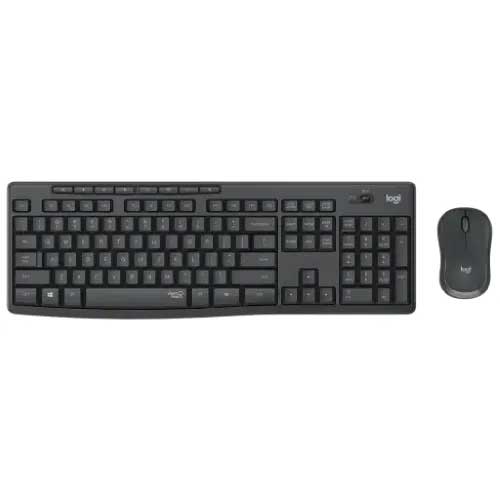
Logitech MK295 Silent Wireless Keyboard & Mouse Combo
Regular Price:৳3,300.00Availability: SKU: 9.96.83.9069
Quick Overview
-
Support
Saturday – Thursday: 09 AM - 06 PM. -
Payment
Cash on Delivery | Card | Online Payment -
Shipping Cost
Inside Dhaka 100tk | Outside Dhaka 150tk -
Warranty Policy
Read More
Description
Logitech MK295 Silent Wireless Keyboard & Mouse Combo in Bangladesh
The Logitech MK295 Silent Wireless Keyboard & Mouse Combo is a practical, budget-friendly solution for anyone who wants a reliable input combo without the noise of traditional keyboards and mice. In busy Bangladeshi offices, coaching centres, call centres, and home study environments, noise can quickly become distracting. The MK295 addresses this with SilentTouch technology, reducing typing and clicking sound while maintaining a familiar feel.
Whether you are working from a corporate office in Motijheel, running a shop in Old Dhaka, teaching online classes from Mirpur, or studying at home in Chattogram, this combo offers the right balance of quiet operation, comfort, and affordability.
The MK295 is a wireless 2.4 GHz combo that uses a single USB receiver to connect both the keyboard and mouse. This keeps your desk clean and cable-free, which is especially important for small workspaces in homes, coaching centres, or SME offices. Just plug the tiny receiver into a USB port of your desktop or laptop, and you are ready to go—no extra drivers needed for standard use.
SilentTouch Technology – Up to 90% Less Noise
One of the main reasons Bangladeshi users choose the Logitech MK295 is its quiet operation. Logitech’s SilentTouch technology is designed to reduce the sound of keystrokes and mouse clicks significantly, while keeping a similar typing and clicking feel to traditional Logitech devices.
This is particularly useful in:
- Shared offices where many people work in the same room.
- Call centres and BPOs where background noise must stay low.
- Libraries and study rooms in universities and schools.
- Home environments where other family members are resting, studying, or working.
Imagine an accounting team in Gulshan typing throughout the day, or an NGO office in Banani filled with data entry operators. With traditional keyboards and mice, the constant noise can become tiring. With the MK295, the sound is much more controlled and subtle, helping to create a more peaceful work atmosphere.
Full-Size Keyboard with Comfortable Layout
The keyboard in the Logitech MK295 combo is a full-size layout, including:
- Alphanumeric keys
- Function keys (F1–F12)
- Arrow keys
- Full number pad
This makes it suitable for:
- Accountants and finance staff who work in Excel or accounting software.
- Data entry operators inputting large volumes of information.
- Office staff preparing letters, reports, and spreadsheets.
- Students writing assignments and doing online exams.
The keycaps are shaped for comfortable typing, and the familiar layout helps new users in Bangladesh transition from basic office keyboards without a learning curve.
Many offices, schools, and coaching centres in Bangladesh still use very basic, low-quality keyboards that are noisy and uncomfortable. Upgrading to the MK295 improves comfort instantly without a big increase in cost.
Silent Wireless Mouse for Daily Use
The combo’s wireless mouse is compact, simple, and designed for everyday use:
- Comfortable shape suitable for most hand sizes.
- Silent click buttons to reduce noise when browsing, clicking, or working in software.
- Smooth cursor control for most standard resolutions and monitor sizes.
This makes it ideal for a wide range of tasks:
- Web browsing and email management.
- Working with office applications (Word, Excel, PowerPoint).
- Online classes and LMS platforms such as Google Classroom, Zoom, and Microsoft Teams.
- Business applications like ERP, POS software, and CRM.
For small desks in apartments, hostels, or small offices in towns across Bangladesh, this simple wireless mouse provides all the functionality required for office and home tasks.
Reliable 2.4 GHz Wireless Connection
The Logitech MK295 uses 2.4 GHz wireless with a USB receiver. Both the keyboard and mouse connect through this single receiver. Advantages include:
- Reduced cable clutter on the desk.
- Strong, reliable connection for typical home and office distances.
- Plug-and-play setup—no complex pairing process for basic use.
For IT managers and office admins in Bangladesh, deploying the MK295 is easy. Staff can start using their keyboard and mouse quickly after plugging in the receiver, which is a big advantage when setting up multiple workstations at once.
This is particularly beneficial in:
- New office setups in Dhaka or Chattogram.
- Call centres and BPO operations with dozens of PCs.
- Training labs and computer classrooms in schools and institutes.
Long Battery Life for Less Hassle
The Logitech MK295 combo is designed for long battery life in both the keyboard and mouse (exact duration varies with usage and battery type). This reduces the frequency of battery changes and helps maintain productivity.
For Bangladesh, where device maintenance can become a hassle in large offices, long battery life means:
- Less time spent by IT staff changing batteries.
- Fewer disruptions in work as devices suddenly stop responding.
- Better overall cost efficiency over the lifetime of the product.
Most users in offices and homes can expect months of use before needing to replace batteries, depending on use patterns.
Spill-Resistant Design and Durable Build
Accidental spills of tea, coffee, or water are not uncommon on desks in Bangladesh. The MK295 keyboard includes a spill-resistant design (within reasonable limits), which helps protect the device from small incidental spills. While it is not waterproof, this added protection can extend the keyboard’s usable life in real-world office and home conditions.
The build quality is aligned with Logitech’s standard for everyday peripherals:
- Sturdy enough for daily typing.
- Designed to handle regular office and home use.
- Reliable performance over time for typical workloads.
This durability matters for schools, NGOs, and government offices in Bangladesh that must watch budgets and want devices that last.
Perfect for Multi-User and Institutional Environments
Because the Logitech MK295 is simple, quiet, and easy to deploy, it is especially suitable for:
- Corporate offices with many employees.
- Government departments handling administrative work.
- NGOs and international organisations with data collection teams.
- Schools, colleges, and universities with computer labs.
- Coaching centres and training institutes conducting digital classes and exams.
For these institutional buyers, BME can supply the MK295 in bulk, helping to standardise keyboard and mouse setups across labs or departments, reducing complexity in maintenance and training.
Ideal for Remote Work and Online Classes
As remote work and online education have grown in Bangladesh, especially in Dhaka, Sylhet, and other major cities, more households need:
- A comfortable keyboard for long typing.
- A reliable mouse for online platforms.
- Quiet operation to avoid disturbing family members.
The MK295 fits this role well as an all-in-one wireless combo that is easy to connect to laptops and desktops, whether for Zoom meetings, Google Meet classes, or freelancing tasks on platforms like Upwork and Fiverr.
Simple Setup – Plug and Play
The Logitech MK295 works with commonly used operating systems such as Windows and others that support standard USB keyboard and mice. For most users:
- Plug the wireless USB receiver into a free USB-A port.
- Insert batteries into the keyboard and mouse if not pre-installed.
- The combo is ready to use—no complex driver installation required for basic operation.
This ease of setup is beneficial for:
- Users who are not very tech-savvy.
- Offices without a dedicated IT team.
- Quick deployment in new branches or locations.
✅ Key Features
- SilentTouch Technology – Significant noise reduction in keyboard typing and mouse clicks, ideal for quiet workspaces.
- Full-Size Keyboard Layout – Includes number pad and function keys for efficient data entry and office tasks.
- Wireless 2.4 GHz Connection – Single USB receiver connects both keyboard and mouse for clutter-free setup.
- Comfortable Silent Mouse – Compact, quiet-click mouse suitable for everyday browsing and office use.
- Long Battery Life – Designed to run for extended periods before batteries need to be replaced.
- Spill-Resistant Keyboard Design – Helps protect against small accidental liquid spills in real-world environments.
- Plug-and-Play Setup – Simple installation with no need for additional drivers for standard use.
✅ Usage / Applications
- Corporate and SME Offices – For reception, admin, HR, finance, operations, and management teams.
- Call Centres and BPOs – Quiet operation helps maintain a professional environment during calls.
- Schools, Colleges, and Universities – Ideal for computer labs, teachers’ desks, and online classes.
- NGOs and Development Projects – For data entry, reporting, and office administration across Bangladesh.
- Home Offices and Freelancers – For long daily use with minimal noise and comfortable typing.
- Coaching Centres and Training Institutes – For instructor PCs and student workstations.
- Retail and Front Desk Use – For POS systems, billing counters, and customer service desks.
✅ Benefits of This Product?
- Quieter Work Environment – Reduced typing and clicking noise creates a calmer, more focused workspace.
- Improved Comfort for Daily Tasks – Full-size keyboard and responsive mouse make everyday work smoother.
- Less Desk Clutter – Wireless design with a single receiver keeps your desk tidy and manageable.
- Budget-Friendly Professional Setup – Offers essential features for offices and homes without high costs.
- Reduced Maintenance – Long battery life and durable build reduce the need for frequent replacements.
- Easy Deployment in Bulk – Simple plug-and-play setup makes it ideal for organisations rolling out many units.
- Versatile for Different Users – Suitable for staff, students, teachers, freelancers, and home users alike.
✅ Ideal For
- Office employees and managers needing a quiet, reliable keyboard and mouse for daily work.
- Call centre and BPO operators who require low-noise input devices during voice support.
- Teachers and students participating in online classes and digital exams.
- SME owners and shopkeepers using PCs for billing, inventory, and accounts.
- NGOs and field offices needing robust, easy-to-use peripherals.
- Parents setting up home study corners for their children.
- Institutions equipping computer labs with quiet, dependable peripherals.
✅ Why Choose the Logitech MK295 Silent Wireless Keyboard & Mouse Combo?
- Best of Both Worlds: Quiet and Familiar – Keeps the traditional Logitech feel while greatly reducing noise.
- Complete Solution in One Box – Includes both keyboard and mouse, ready for deployment for any workstation.
- Trusted Global Brand – Logitech is widely recognised in Bangladesh for reliable office and home peripherals.
- Suitable for Many Environments – From corporate towers in Dhaka to regional offices and homes, it fits diverse needs.
- Efficient and Practical – Focuses on what most users truly need: reliability, comfort, silence, and simplicity.
✅ Why Buy This Product from BME?
- Genuine Logitech Product in Bangladesh – BME sources original Logitech units, helping you avoid counterfeit or low-quality alternatives.
- Official Warranty Support – BME assists with warranty claims as per Logitech’s official policy for Bangladesh.
- Experience with Corporate and Institutional Supply – BME regularly supplies IT and office equipment to banks, NGOs, corporates, and educational institutions.
- Bulk and Project Orders – Ideal partner if you need MK295 combos for multiple desks, labs, or branches.
- Pre-Sales and After-Sales Guidance – Get help choosing the right combo for your usage, and support after purchase.
- Reliable Delivery Across Bangladesh – Ability to ship to Dhaka and other districts, subject to logistics arrangements.
- Transparent Quotes and Documentation – Proper invoices and quotations for tenders, procurement, and organisational purchasing.
✅ Buying Guide
1. Identify Your Main Use Case
Think about where you plan to use the Logitech MK295:
- Office – Quiet typing and clicking in shared rooms.
- Home – Study, freelance work, or family PC.
- Institutional – Lab, classroom, call centre, or NGO office.
If you need low noise, reliable wireless, and basic comfort, the MK295 is a strong option.
2. Check Device Compatibility
- Ensure your desktop or laptop has a USB-A port for the wireless receiver.
- The combo is designed to work with common operating systems that support standard USB keyboards and mice (such as Windows and others).
3. Consider Your Workspace Size and Layout
- If your desk is small, a wireless combo helps reduce cable mess.
- If you have many PCs in one room, silent devices like the MK295 help keep noise low.
4. Evaluate Noise Sensitivity
Choose the MK295 if:
- You work in a quiet office or around people who are easily disturbed.
- You share your workspace with colleagues, family members, or roommates.
- You run a call centre or training centre where background noise must be controlled.
5. Plan for Power and Batteries
- The MK295 uses batteries for both keyboard and mouse.
- For bulk deployments, consider keeping spare batteries available.
- Long battery life reduces how often you have to change them.
6. Confirm Authenticity and Warranty with BME
Before purchasing:
- Ask BME about warranty duration and claim process.
- Ensure you receive a sealed, original Logitech product.
- Keep your invoice or purchase document for future service support.
7. Check Latest Price and Offers
Component prices in Bangladesh can change due to currency and import factors. For the current Logitech MK295 Silent Wireless Keyboard & Mouse Combo price in Bangladesh, check BME’s website or contact their sales team. For institutional buyers, ask about special pricing for bulk quantities.
✅ Customers Ask About / Frequently Asked Questions
Q1: Is the Logitech MK295 really silent?
Answer: The MK295 uses SilentTouch technology to significantly reduce keyboard and mouse noise compared to standard Logitech combos, while keeping a similar typing and clicking feel. It is not completely silent, but much quieter than typical devices.
Q2: Does the MK295 work with laptops as well as desktops?
Answer: Yes. As long as your laptop has a USB-A port for the receiver and supports standard USB keyboards and mice, the MK295 will work.
Q3: Can I use the keyboard and mouse with different receivers?
Answer: The keyboard and mouse in the MK295 combo are pre-paired to the included receiver. They are designed to be used together via that single receiver.
Q4: How far can I use the MK295 from the receiver?
Answer: In typical home and office conditions, the 2.4 GHz wireless connection supports comfortable desk-range distances. Performance can vary with obstacles and interference.
Q5: Is the keyboard spill-resistant?
Answer: The MK295 keyboard includes a spill-resistant design to help protect against small accidental spills, but it is not waterproof. Liquids should be wiped off immediately.
Q6: Does the MK295 support Bangla typing?
Answer: The physical keys usually have English legends. You can type Bangla using appropriate Bangla keyboard layouts or software in your operating system, even if the keycaps do not show Bangla characters.
Q7: Is any software required to use the MK295?
Answer: For standard use, no extra software is required. It is typically plug-and-play. Your OS may automatically install basic drivers.
Q8: How long do the batteries last?
Answer: Actual battery life depends on usage and battery quality. The MK295 is designed for long battery life for typical office and home use, reducing how often you need to replace batteries.
Q9: Is the MK295 suitable for gaming?
Answer: The MK295 is primarily designed for office and home productivity. It can be used for casual gaming, but serious gamers might prefer dedicated gaming keyboards and mice from Logitech G.
Q10: Does BME provide warranty for the Logitech MK295?
Answer: Yes. BME provides support in line with the official Logitech warranty for Bangladesh. Confirm the exact warranty period and terms at the time of purchase.
✅ Why Buy This Product
- Quiet, comfortable combo for everyday office and home tasks.
- All-in-one wireless solution—keyboard and mouse included, using a single receiver.
- Ideal for Bangladesh workplaces and homes where noise control and reliability matter.
- Backed by Logitech’s reputation and BME’s local support, making it a safe and practical choice for individuals and organisations.
What is the price of Logitech MK295 Silent Wireless Keyboard & Mouse Combo in Bangladesh?
Write a review
Question Answer
Have question about this product? Get specific details about this product from expert.