

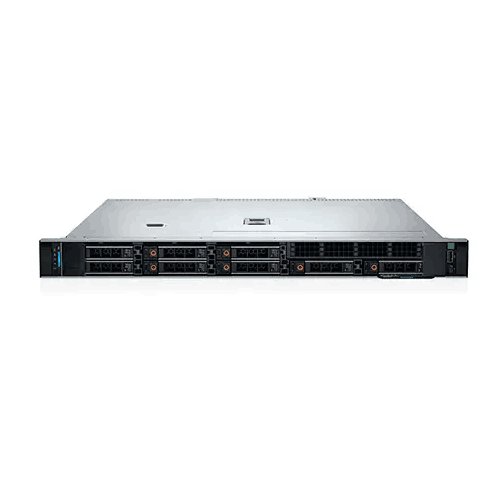
Dell PowerEdge R360 Intel Xeon E-2434 16GB RAM 4TB HDD Rack Server
Regular Price:৳0.00Availability: SKU: 2.83.4.9149
Quick Overview
-
Support
Saturday – Thursday: 09 AM - 06 PM. -
Payment
Cash on Delivery | Card | Online Payment -
Shipping Cost
Inside Dhaka 100tk | Outside Dhaka 150tk -
Warranty Policy
Read More
Description
Dell PowerEdge R360 Intel Xeon E-2434 16GB RAM 4TB HDD Rack Server Price in Bangladesh
This particular configuration combines an Intel Xeon E-2434 3.4GHz processor, 16GB DDR5 ECC memory, two 2TB SATA 6Gbps hard drives, and a PERC H755 RAID controller. That gives the system a total of 4TB of raw physical drive capacity before RAID configuration. The PowerEdge R360 itself is a 1U, single-socket server platform designed around Intel Xeon E-2400-series and other supported processor options. Dell documents four DIMM slots and support for SAS/SATA storage configurations on the R360.
For a Bangladesh business, this configuration can be considered when the goal is to establish centralized computing and storage infrastructure in a rack-based environment. It can be used for compatible file services, business applications, databases, network services, and other professional workloads, provided the final workload requirements are matched with the installed processor, memory, storage, operating system, and software.
The Dell PowerEdge R360 4TB HDD configuration is particularly relevant when storage capacity is an important consideration. The two 2TB SATA drives provide more raw capacity than a comparable 2TB total configuration, while the PERC H755 provides hardware RAID functionality for supported RAID arrangements.
PowerEdge R360 as a Professional Rack Server
The physical architecture immediately separates the R360 from an ordinary desktop computer. Dell identifies the PowerEdge R360 as a 1U server, meaning it is designed for rack-based installation rather than conventional desk or floor placement. Dell's documentation describes the platform as supporting one Intel Xeon 6300-series processor, one Intel Xeon E-2400-series processor with up to eight cores, or a supported Intel Pentium processor, depending on configuration.
For an organization with an existing rack cabinet, this form factor allows computing equipment to be consolidated within a structured server environment.
A rack-based design can also simplify physical organization. Network switches, patch panels, power equipment, storage systems, and servers can be arranged within a dedicated infrastructure rather than scattered across office spaces.
The compact form factor is therefore an important part of the product's practical value. The R360 is intended to become part of an IT infrastructure, not simply function as a powerful standalone computer.
Intel Xeon E-2434 Processing Platform
The supplied configuration uses the Intel Xeon E-2434 at 3.4GHz. Dell's current PowerEdge R360 configuration page lists the Xeon E-2434 as a processor option and specifies it as a 4-core/8-thread processor with 12MB cache and a 55W thermal design, with Turbo and Hyper-Threading support.
The processor's relevance becomes clearer when considering typical server workloads. A server may need to process multiple requests while simultaneously handling background services, storage operations, user connections, system monitoring, and application processes.
The four physical cores and eight threads provide a dedicated processing foundation for workloads that fit the capacity of the configuration.
However, server performance should always be evaluated against the actual software environment. A small file server, internal business application, and heavily consolidated virtualization host can have very different processor requirements. Buyers should therefore consider concurrent users, applications, databases, virtual machines, and expected growth before finalizing the configuration.
For workloads that align with the processor's capabilities, the Xeon E-2434 gives the R360 a modern server-oriented CPU platform rather than relying on consumer desktop hardware.
16GB DDR5 ECC Memory
The server includes 16GB of DDR5 ECC memory, with the supplied specification identifying the memory as 4800MT/s. Dell's R360 documentation confirms support for DDR5 ECC UDIMM memory and four memory sockets. Dell's memory matrix also shows that rated 4800MT/s modules may operate at lower speeds depending on configuration and processor limitations.
This distinction is important when writing accurate server specifications. A module's rated speed is not necessarily identical to the system's actual operating speed under every configuration.
ECC memory is appropriate for professional server environments where memory integrity matters. The R360 uses ECC UDIMM memory rather than ordinary consumer desktop memory, and Dell documents four DIMM slots in the platform.
The supplied 16GB capacity can provide a practical starting point for many server deployments. Nevertheless, memory requirements depend heavily on the operating system and applications.
A file server with a relatively small number of users can have different requirements from a database server or a virtualization host. Before ordering, businesses should determine how much RAM their intended applications require and whether future expansion is likely.
Dell documents higher memory configurations for the R360, with supported capacity depending on the DIMM type and configuration.
4TB Total Raw SATA Storage
Storage is one of the defining characteristics of this configuration. The server includes 2 × 2TB SATA 6Gbps hard drives, providing 4TB of raw physical capacity.
The PowerEdge R360 supports both SAS and SATA storage, and Dell's system documentation states that the platform supports 6Gbps SATA and 12Gbps SAS3, with drive speed determined by the controller capability.
SATA storage can be appropriate for workloads where capacity and cost are important considerations. The exact performance of the installed drives will depend on their individual characteristics, including rotational speed and other drive specifications that have not been provided for this particular configuration.
The two-drive arrangement also creates a straightforward starting point for RAID planning.
For example, if the two 2TB drives are configured as RAID 1, the data is mirrored between the drives. This improves redundancy against the failure of one drive but reduces usable capacity compared with using both drives as independent storage.
If configured as RAID 0, the drives can be striped for a combined logical capacity, but RAID 0 does not provide redundancy. Dell documents these characteristics as part of its PERC RAID architecture.
Therefore, the phrase 4TB HDD should be understood as the total raw capacity of the two physical 2TB drives, not necessarily the amount of usable capacity after RAID configuration.
PERC H755 Hardware RAID Controller
The inclusion of the PERC H755 RAID controller makes this configuration particularly relevant to organizations that need hardware-based storage management.
Dell's official PERC 11 documentation lists the H755 among its hardware RAID controllers and confirms support for RAID 0, RAID 1, RAID 5, RAID 6, RAID 10, RAID 50, and RAID 60. The documentation also identifies a battery backup unit for the H755.
This gives administrators several ways to structure storage depending on drive count and workload priorities.
RAID 0 focuses on striping without redundancy. RAID 1 mirrors data between two drives. RAID 5 uses distributed parity, while RAID 6 uses two parity blocks. RAID 10 combines mirroring and striping. RAID 50 and RAID 60 combine RAID 0 striping with RAID 5 or RAID 6 elements respectively.
There is an important practical point for this specific configuration: the H755 supports many RAID levels, but two installed drives cannot create every supported RAID level.
Dell's documentation states that RAID 1 requires a minimum of two drives, RAID 5 requires three, RAID 6 requires four, RAID 10 requires four, RAID 50 requires six, and RAID 60 requires eight.
Therefore, with the supplied two-drive configuration, RAID 1 is the relevant redundant RAID option among those listed, while additional drives would be necessary for RAID 5, RAID 6, RAID 10, RAID 50, or RAID 60.
Storage Capacity Versus Redundancy
Choosing a RAID level is ultimately a matter of matching storage architecture to the organization's requirements.
With two 2TB drives, using RAID 1 means each drive maintains a mirrored copy. The usable capacity is therefore approximately equivalent to one 2TB drive before filesystem and formatting overhead.
This may be appropriate where protecting against a single physical drive failure is more important than maximizing available capacity.
Using RAID 0 would make the two drives operate as a striped array, but there would be no drive-level redundancy. A failure of either drive could affect the entire array.
For business-critical information, RAID should be considered alongside an independent backup strategy. RAID can address certain drive-failure scenarios, but it does not protect against every form of data loss.
A well-planned server environment should therefore consider both storage redundancy and backup/recovery rather than treating RAID as a complete backup solution.
Server Memory Expansion
One advantage of selecting a server platform is the ability to plan for future requirements.
The R360 includes four memory sockets, and Dell's documentation provides supported DDR5 ECC UDIMM configurations beyond the supplied 16GB configuration.
This means an organization can evaluate memory expansion as workloads grow, subject to Dell's supported memory rules.
However, memory should not simply be added without considering population guidelines. Dell notes that unbalanced memory configurations can result in performance loss and recommends appropriate channel population for optimal performance.
For a business purchasing the server as part of a long-term infrastructure plan, it is therefore useful to consider both current and anticipated RAM requirements.
SATA Storage for Practical Business Capacity
The use of SATA hard drives makes this particular configuration different from a server built entirely around high-performance SSD storage.
Hard-drive-based storage can make sense when the primary requirement is larger capacity rather than the lowest possible storage latency. The appropriate choice depends on the application.
For file storage, archives, selected business applications, and workloads that are not heavily dependent on low-latency random storage access, HDD-based configurations can be considered.
On the other hand, applications with demanding database I/O, heavy virtualization, or high transaction workloads may require a different storage design. The R360 platform supports broader storage configurations, so organizations can evaluate their requirements before deployment. Dell documents multiple SAS/SATA drive configurations for the platform.
1U Rackmount Design for Space-Conscious Infrastructure
In a professional server room, physical space can be a real infrastructure consideration.
The Dell PowerEdge R360 1U rack server is designed to fit within standard rack-based environments. Dell describes it as a 1U, single-socket rack server.
For organizations in Bangladesh with a limited server-room footprint, a 1U architecture allows computing resources to be organized vertically within a rack.
This can be useful for businesses that expect to operate multiple network devices and servers in the same environment. Rack-based deployment also makes cable management, physical access, and equipment organization easier when the infrastructure is properly planned.
Before purchase, however, businesses should verify rack dimensions, rail requirements, depth, power distribution, airflow, and available space for the specific configuration.
Server Management with iDRAC
The PowerEdge ecosystem includes integrated server-management capabilities. Dell's current R360 configuration information lists iDRAC9 options, including Basic, Express, Enterprise, and Datacenter configurations.
iDRAC is designed to provide administrators with a dedicated management interface for PowerEdge systems. Dell also provides an iDRAC9 User's Guide and current R360 documentation as part of the platform's support resources.
This type of management is valuable when a server is located inside a rack rather than next to an administrator's workstation.
The exact iDRAC license or feature level should be confirmed for the supplied configuration. It should not be assumed that every R360 sold through every configuration includes the same iDRAC feature set.
A Centralized Platform for Business Applications
A dedicated rack server can centralize computing resources that would otherwise be distributed across individual PCs.
For example, an organization might use the R360 to host compatible internal applications, shared file services, database software, or network-oriented infrastructure.
Centralization can also simplify administration because the organization has a defined server platform rather than relying on an employee workstation to perform a server role.
However, workload sizing remains essential. The supplied 16GB RAM and Xeon E-2434 processor should be evaluated against the actual application requirements before deployment.
The R360 is a platform, not a guarantee that every application will perform identically. Application architecture, database optimization, network bandwidth, storage configuration, operating system, and user concurrency can all affect real-world results.
Business File and Document Services
One practical application for a 4TB configuration is centralized file storage.
Businesses often need a common location for documents, project files, shared resources, departmental folders, and internal data. A dedicated server can provide a centralized platform for these services when configured with the appropriate operating system, permissions, backup, and security policies.
The 4TB raw drive capacity gives the supplied configuration more physical storage than a 2TB total configuration, although usable space depends on the selected RAID arrangement.
For organizations that choose RAID 1, the emphasis is on mirroring rather than retaining the full 4TB as usable capacity.
Database and Application Workloads
The Xeon E-2434 configuration can also be considered for compatible database and application-server workloads.
The important word is compatible. Database performance depends on factors including RAM capacity, storage latency, CPU utilization, database size, query patterns, concurrency, and application architecture.
For a small or moderate database deployment that fits within the available resources, the server can provide a dedicated infrastructure platform.
For a larger database environment, buyers should evaluate whether more memory, faster storage, additional drives, or a higher-core processor is appropriate.
Virtualization Considerations
The R360 can also be considered for selected virtualization workloads, but virtualization should be planned carefully.
Every virtual machine consumes some combination of CPU resources, memory, storage I/O, and network bandwidth. The supplied 16GB memory may be suitable for a modest virtualization requirement, but organizations planning several virtual machines should calculate the required memory and CPU resources before purchasing.
Similarly, the two-drive SATA configuration should be evaluated according to the expected virtual-machine I/O workload.
A virtualization deployment should therefore be designed from the application requirements outward rather than assuming that every server configuration is suitable for every number of virtual machines.
Business Infrastructure in Bangladesh
For organizations in Bangladesh, server selection often involves more than hardware specifications.
The server may need to operate within an existing rack, network, backup-power system, security environment, and IT support structure.
Before deploying the Dell PowerEdge R360, organizations should consider electrical infrastructure, rack compatibility, cooling, network connectivity, operating-system licensing, backup procedures, and physical access.
The server's power configuration should also be verified against the exact unit being purchased. Dell offers different power-supply configurations for the R360 platform, so a specific PSU configuration should not be assumed without confirmation.
Maintenance and Data Protection
A server environment should be maintained differently from a normal office computer.
The rack and server area should have suitable airflow, and administrators should monitor hardware status and storage health. Firmware and system-management procedures should follow the manufacturer's documentation.
When adding memory or changing internal hardware, administrators should use appropriate ESD and service procedures. Dell's R360 service documentation provides specific instructions for memory installation and system servicing.
Storage maintenance is equally important. If the server contains business-critical information, organizations should maintain independent backups and periodically verify that data can actually be restored.
A RAID array can improve resilience against certain disk failures, but it should not be considered a replacement for an independent backup.
A Balanced 4TB Server Configuration
The appeal of this particular configuration is its balance between processing, memory, storage, and rack efficiency.
The Intel Xeon E-2434 provides a 4-core/8-thread server processor. The 16GB DDR5 ECC configuration establishes a professional memory platform. The 2 × 2TB SATA HDDs provide 4TB of raw physical storage, while the PERC H755 adds hardware RAID capabilities. Dell confirms that the H755 supports RAID 0, 1, 5, 6, 10, 50, and 60, subject to the required number of physical drives.
The result is a compact 1U server configuration that can be evaluated for a wide range of small and medium-scale professional workloads.
The correct deployment, however, depends on matching the server to the application. Buyers should verify the workload, RAM requirement, storage requirement, RAID objective, operating system, rack environment, and network design before purchase.
✅ Key Features
- Intel Xeon E-2434 Processor: Provides 4-core/8-thread server-class processing at a supplied 3.4GHz frequency for compatible business workloads.
- 16GB DDR5 ECC Memory: Provides an ECC-based server memory configuration suitable for professional infrastructure applications.
- 4TB Raw SATA Storage: Combines two 2TB SATA 6Gbps hard drives for substantial starting storage capacity.
- PERC H755 Hardware RAID: Provides multiple RAID options for structured storage and redundancy planning.
- 1U Rackmount Chassis: Fits the PowerEdge R360 into compact rack-based server infrastructure.
- Four DDR5 DIMM Slots: Provides a defined path for supported memory expansion as workload requirements increase.
- SATA 6Gbps Support: Supports the supplied SATA storage interface within the R360's documented storage architecture.
- iDRAC9 Ecosystem: Supports Dell's integrated remote-management platform, with the exact license level depending on configuration.
- Single-Socket Server Platform: Provides a dedicated rack-server architecture for organizations that do not require a dual-socket system.
- Professional Storage Management: Hardware RAID capability allows storage configuration to be planned around capacity and redundancy requirements.
✅ Usage / Applications
- Business File Server: Centralize shared documents and organizational files.
- Database Server: Host compatible database applications where the processor, memory, and storage configuration meet the workload requirements.
- Application Server: Run selected internal business applications on a dedicated server platform.
- Office IT Infrastructure: Provide centralized services for small and medium-sized organizations.
- Network Services: Host compatible infrastructure and network-oriented applications.
- Educational Institutions: Support selected institutional applications, file services, and internal IT systems.
- Virtualization: Support appropriately sized virtualization deployments after calculating CPU, memory, storage, and network requirements.
- Branch Office Server: Provide centralized computing resources for branch locations.
- Data Storage: Provide a larger raw storage starting point for organizational data and files.
- Rack-Based Data Center Deployment: Integrate into professional server racks where 1U space efficiency is important.
✅ Benefits of This Product?
- 4TB Raw Storage: Provides two 2TB physical drives for a higher-capacity starting configuration.
- Hardware RAID Capability: PERC H755 provides several RAID options for supported drive configurations.
- Server-Class Processor: Xeon E-2434 provides a dedicated server-oriented processing platform.
- ECC DDR5 Memory: Uses a memory architecture intended for professional server environments.
- Compact Infrastructure: The 1U chassis helps conserve rack space.
- Memory Expansion: Four DIMM sockets provide additional configuration flexibility.
- Centralized Computing: Allows selected business services to operate from a dedicated server.
- Storage Flexibility: The R360 platform supports both SAS and SATA storage configurations.
- Remote Management Options: iDRAC9 provides an integrated management ecosystem for PowerEdge servers.
✅ Ideal For
The Dell PowerEdge R360 Intel Xeon E-2434 16GB RAM 4TB HDD Rack Server is intended for organizations that need dedicated computing and storage infrastructure in a compact rack-based form factor.
It can be considered by small and medium-sized businesses, corporate offices, educational organizations, IT departments, branch offices, system integrators, and organizations building or expanding a server room.
The 4TB raw storage configuration makes the system particularly relevant where storage capacity is an important part of the requirement. Meanwhile, the PERC H755 provides hardware RAID capabilities for organizations that need to design their storage around redundancy, capacity, or performance objectives.
The 16GB ECC memory and Xeon E-2434 processor provide a defined starting configuration, while the R360 platform's four DIMM sockets allow supported memory expansion.
For Bangladesh businesses, this server can be appropriate where centralized files, business applications, selected databases, network services, or other compatible workloads need to be hosted on dedicated hardware.
Buyers should nevertheless size the configuration according to actual application requirements. Organizations planning heavy virtualization, large databases, or high-I/O workloads should evaluate whether additional memory, faster storage, more drives, or a different processor configuration is necessary.
✅ Why Choose the Dell PowerEdge R360 Intel Xeon E-2434 16GB RAM 4TB HDD Rack Server?
The Dell PowerEdge R360 combines a compact rack-oriented architecture with server-class processing, ECC memory, substantial raw storage, and hardware RAID functionality.
The supplied Intel Xeon E-2434 is a 4-core/8-thread processor running at 3.4GHz, with Dell listing 12MB cache and a 55W thermal design for this processor option. This makes the configuration a defined platform for compatible business and infrastructure workloads.
The storage configuration is equally important. Two 2TB SATA drives provide 4TB of raw physical capacity, while the PERC H755 provides hardware RAID support. Dell confirms RAID 0, 1, 5, 6, 10, 50, and 60 support for the H755, although the number of installed drives determines which levels can actually be configured.
The R360 also provides a modern DDR5 ECC memory platform with four DIMM sockets. That gives organizations flexibility when future workload requirements increase, subject to Dell's memory compatibility rules.
Its 1U chassis makes it suitable for rack environments where physical space matters. Dell describes the R360 as a 1U, single-socket rack server, while its platform documentation covers SAS/SATA storage and multiple server-management capabilities.
For organizations seeking a compact Dell server with 4TB raw SATA storage and hardware RAID capability, this configuration provides a clearly defined starting point for professional infrastructure planning.
✅ Why Buy This Product from BME?
Business Machine & Equipment (BME) serves Bangladesh customers looking for business machines, IT hardware, and professional equipment. For server procurement, selecting the correct configuration is especially important because processor, memory, storage, RAID, rack, power, and operating-system requirements can vary considerably between projects.
When evaluating the Dell PowerEdge R360, customers can use the supplied configuration as the reference point: Intel Xeon E-2434 3.4GHz, 16GB DDR5 ECC memory, 2 × 2TB SATA 6Gbps hard drives, and PERC H755 RAID controller.
For business or institutional procurement, buyers should confirm the exact configuration before purchase. This includes the processor, installed memory, hard-drive type and capacity, RAID controller, chassis configuration, power-supply configuration, operating-system requirements, rails, and any additional accessories required for the deployment.
BME can be approached for product guidance based on the customer's intended application and configuration requirements. Buyers can also clarify procurement-related requirements before placing an order so that the selected server corresponds with the intended project.
For organizations in Bangladesh, server procurement should be approached as an infrastructure decision rather than simply a hardware purchase. Rack compatibility, power, cooling, network connectivity, RAID planning, backup strategy, and operating-system requirements should all be considered.
BME can therefore be used as a point of contact for discussing the required Dell PowerEdge R360 configuration and determining whether the supplied specification aligns with the customer's planned environment.
✅ Buying Guide
1. Define the Application: Start by identifying exactly what the server will run. File sharing, databases, business software, virtualization, and network services can have very different resource requirements.
2. Confirm the Processor: This configuration uses the Intel Xeon E-2434 3.4GHz. Dell lists it as a 4-core/8-thread processor with 12MB cache and Turbo/Hyper-Threading support.
3. Evaluate the 16GB RAM: Determine whether 16GB is sufficient for your operating system and applications. If virtualization or memory-intensive applications are planned, calculate the expected memory requirement before ordering.
4. Check Memory Expansion: The R360 provides four DDR5 ECC UDIMM sockets. Dell documents supported memory configurations and operating-speed limitations depending on DIMM population and processor.
5. Understand the 4TB Storage: The configuration contains two separate 2TB SATA drives. The 4TB figure represents raw physical capacity before RAID configuration and filesystem overhead.
6. Choose RAID According to the Objective: With two drives, RAID 1 can provide mirroring. RAID 5 requires at least three drives, RAID 6 requires four, and RAID 10 requires four according to Dell's PERC documentation.
7. Confirm Storage Requirements: If the application requires high I/O performance, consider whether HDD storage is sufficient. Do not assume that a larger capacity automatically means faster application performance.
8. Check Rack Compatibility: Confirm that your rack cabinet, rail system, depth, airflow, and available 1U space are appropriate for the R360.
9. Verify Power Requirements: Confirm the exact power-supply configuration of the unit being purchased and compare it with the site's electrical and backup-power infrastructure.
10. Plan Network Connectivity: Confirm the required network interfaces and compatibility with your switches, cabling, VLAN structure, and network architecture.
11. Select the Operating System: Choose the operating environment according to application requirements, licensing, administrator expertise, and vendor support.
12. Plan Backup Separately: Do not treat RAID as a complete backup strategy. Important business data should have an independent backup and recovery process.
13. Consider Future Expansion: Estimate future requirements for memory, storage, applications, users, and virtualization before finalizing the configuration.
14. Confirm the Exact Product Configuration: Server configurations can differ. Confirm the exact CPU, RAM, drives, RAID controller, chassis, PSU, rails, and included accessories before placing an order.
✅ Customers Ask About / Frequently Asked Questions
Q: What processor is included in this Dell PowerEdge R360?
A: This configuration uses the Intel Xeon E-2434 at 3.4GHz. Dell lists the E-2434 as a 4-core/8-thread processor with 12MB cache and Turbo/Hyper-Threading support.
Q: How much storage does this Dell R360 have?
A: The supplied configuration has two 2TB SATA 6Gbps hard drives, giving 4TB of raw physical storage before RAID configuration.
Q: Does 4TB mean I will have 4TB of usable RAID storage?
A: Not necessarily. Usable capacity depends on the RAID configuration. For example, two 2TB drives configured as RAID 1 provide mirrored storage rather than 4TB of usable capacity.
Q: Does the PERC H755 support RAID 1?
A: Yes. Dell documents RAID 1 support for the PERC H755. RAID 1 requires at least two drives.
Q: Can I use RAID 5 with the two included drives?
A: No. Dell documents a minimum of three physical drives for RAID 5. Additional drives would therefore be required.
Q: Can this server use RAID 10?
A: The PERC H755 supports RAID 10, but Dell documents a minimum of four drives for RAID 10. The supplied two-drive configuration therefore cannot create a RAID 10 array without additional drives.
Q: Is the Dell PowerEdge R360 a 1U rack server?
A: Yes. Dell identifies the R360 as a 1U, single-socket rack server.
Q: Can the RAM be upgraded later?
A: The R360 has four DDR5 ECC UDIMM memory sockets. Supported expansion depends on Dell's memory specifications and population rules.
Q: Does the R360 support SATA drives?
A: Yes. Dell documents SATA support up to 6Gbps on the R360 and also supports SAS storage configurations.
Q: Is RAID the same as backup?
A: No. RAID can provide redundancy against certain drive failures, but it does not replace an independent backup and recovery system.
Q: Is this server suitable for a Bangladesh business?
A: The R360 is a professional rack-server platform, but suitability depends on the intended workload and the site's rack, power, cooling, network, and backup infrastructure. The exact PSU configuration should be confirmed before deployment.
Q: Can the server be used for virtualization?
A: It can be considered for appropriately sized virtualization workloads, but the number and type of virtual machines should be calculated against the available CPU, 16GB memory, storage performance, and network requirements.
✅ Why Buy This Product
The Dell PowerEdge R360 Intel Xeon E-2434 16GB RAM 4TB HDD Rack Server provides a dedicated server platform for organizations that need centralized computing and storage in a compact rackmount design.
Its combination of the Intel Xeon E-2434, 16GB DDR5 ECC memory, 2 × 2TB SATA hard drives, and PERC H755 RAID controller creates a clearly defined configuration for professional infrastructure deployment.
The 4TB raw storage capacity can be useful for organizations where data volume is an important consideration. At the same time, the PERC H755 provides a hardware RAID platform that allows administrators to design storage according to the number of installed drives and the desired balance between capacity and redundancy.
The R360's 1U architecture is also useful for rack-based environments where physical space needs to be managed carefully. Dell's four-slot DDR5 ECC memory architecture provides additional flexibility for supported memory expansion.
For a business, institution, IT department, or professional infrastructure project, choosing the correct server configuration starts with understanding the workload. If the Xeon E-2434, 16GB memory, 4TB raw SATA storage, and available RAID architecture match the project's requirements, this configuration provides a structured foundation for deployment.
Order the Dell PowerEdge R360 today and build your server infrastructure around a dedicated 1U rack platform designed for professional computing environments. Before purchase, confirm the exact configuration and deployment requirements with BME.
What is the price of Dell PowerEdge R360 Intel Xeon E-2434 16GB RAM 4TB HDD Rack Server in Bangladesh?
Write a review
Question Answer
Have question about this product? Get specific details about this product from expert.




Dell PowerEdge T350 Tower Server

Dell PowerEdge R660 Intel Xeon Gold 6426Y Rack Server

Dell PowerEdge R360 Xeon E-2468 Rack Server
Dell PowerEdge R360 Xeon E-2436 Rack Server


