

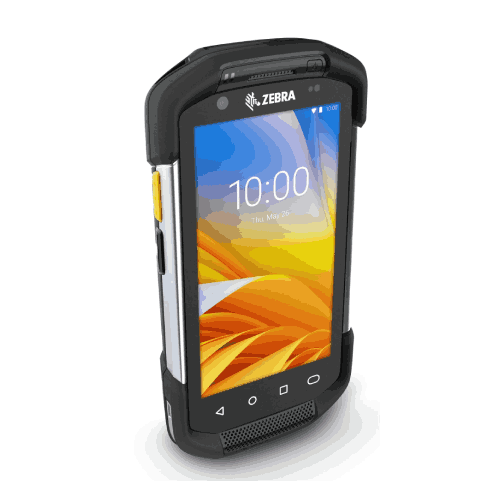
Zebra TC77 Android Handheld Barcode Scanner
Regular Price:৳0.00Availability: SKU: 7.31.19.9203
Quick Overview
-
Support
Saturday – Thursday: 09 AM - 06 PM. -
Payment
Cash on Delivery | Card | Online Payment -
Shipping Cost
Inside Dhaka 100tk | Outside Dhaka 150tk -
Warranty Policy
Read More
Description
Zebra TC77 Android Handheld Barcode Scanner in Bangladesh
The Zebra TC77 Android Handheld Barcode Scanner is in that category: a professional mobility device built to run apps, capture barcodes, and support workflow execution in environments where consumer phones and entry-level scanners struggle.
This product page is designed for BME’s Bangladesh audience and optimized for SEO, GEO, and AI-search. It also follows your strict accuracy rule. You have not provided confirmed technical specifications for the Zebra TC77 (processor, RAM/storage, display, battery, IP rating, connectivity, scan engine, camera, dimensions/weight, etc.). Therefore, the page avoids stating unverified specs and instead focuses on real-world value, buying guidance, and Bangladesh-specific use cases. If you share the TC77 datasheet specs you want included, I can produce a fully spec-rich version while staying 100% factual.
What the Zebra TC77 is designed to do
The Zebra TC77 is typically selected when a business needs a handheld device that can:
- Scan barcodes as part of a process (not just at a counter)
- Run Android-based applications for inventory, delivery, or field workflows
- Stay reliable under frequent daily use
- Support workers who move between zones and need a mobile work tool in hand
In Bangladesh, that often means operations that are past the “one PC, one scanner” stage. The TC77 is used when you want scanning in motion—scanning at receiving, scanning at picking, scanning at dispatch, scanning at customer handover points, and scanning during stock counts.
Why Android handhelds matter for Bangladesh workflows
A wired scanner is a great tool for a single fixed workstation. But most businesses don’t work in one spot anymore. Warehouses have aisles. Retail stores have shelves. Couriers have sorting points. Field sales has routes.
Android handhelds support these workflows because:
- The device can run a task app directly (inventory/WMS/delivery app)
- The worker stays mobile while scanning
- Data can be captured in real time rather than typed later
- Work becomes repeatable—good for training and shift-based operations
For many Bangladesh businesses, the “real” upgrade isn’t the barcode scan itself; it’s the move from delayed updates to point-of-work updates.
Bangladesh use cases where Zebra TC77 fits naturally
Even without listing model-level specs, we can map where a rugged Android handheld scanner is commonly deployed.
1) Warehouse receiving and put-away
Instead of receiving stock, writing on paper, and updating later, staff can scan items as they arrive, confirm quantities, and store them with location accuracy.
2) Picking and packing for eCommerce
Pickers can scan to verify each item during picking and packing, reducing wrong shipments and return costs—very relevant for Bangladesh sellers competing on customer experience.
3) Courier and logistics sorting
Sorting is scanning-heavy. A handheld device allows staff to scan, route, and update status at the point of sorting.
4) Retail back-office inventory
Retail stores often have a hidden inventory problem: system stock doesn’t match physical stock. Mobile cycle counts and shelf verification help reduce these gaps.
5) Field operations and service workflows
Delivery, field service, or sales reps can scan products, log actions, and capture confirmations as they move.
6) Pharma distribution and controlled inventory
Pharma and healthcare supply operations benefit from scan-driven traceability and accurate movement logging.
1D/2D/QR scanning: what you should confirm
Handheld scanners generally support a wide range of barcode types, but exact scanning capability depends on configuration. Since you didn’t specify TC77 scan engine details, this page does not claim 1D/2D support as guaranteed. Many buyers assume all enterprise handhelds scan 2D, but configurations vary.
Before ordering, confirm:
- Whether your TC77 configuration supports 1D only or 1D/2D
- Whether you need QR code scanning
- Whether you need standard range or long range scanning for racks and distance work
BME can help you validate the exact configuration available for your purchase.
Connectivity planning: the part many buyers forget
A handheld device can only be as fast as the system it connects to. In Bangladesh deployments, connectivity issues are often the real bottleneck, not the scanner.
Before rollout, plan:
- Warehouse Wi‑Fi coverage in aisles, staging, loading bay
- Network access policies (guest vs enterprise)
- Real-time vs offline operation (software-dependent)
- Device charging routines and shift-based assignment
If your operation includes both indoor and outdoor movement, consider whether you need cellular-enabled mobility (depends on TC77 configuration).
Implementation advice for Bangladesh businesses
A rugged Android handheld like the Zebra TC77 delivers the best ROI when paired with simple, strict SOPs:
SOP 1: Scan at every checkpoint
Receiving → Put-away → Picking → Packing → Dispatch.
SOP 2: Standardize item labels and location labels
If barcodes are inconsistent, scanning consistency will never be achieved.
SOP 3: Create a device management routine
Charging, storage, and shift handover are critical. Many device problems are actually “no routine” problems.
SOP 4: Start with one workflow, then expand
Begin with cycle counting or receiving, then scale to picking and dispatch verification.
Maintenance and care (general, non-speculative)
- Keep scan windows and screens clean
- Avoid unnecessary drops and rough handling
- Store devices in a defined charging area
- Update apps and firmware as planned by IT, not randomly during peak season
- Use protective handling practices appropriate for warehouse conditions
How to choose the right Zebra TC77 configuration
Since configuration options can vary, buyers should choose based on:
- Primary workflow (warehouse vs field vs retail)
- Required barcode types (1D vs 2D/QR)
- Required scanning distance (standard vs long-range)
- Software platform compatibility (Android app vs web)
- Connectivity requirements (Wi‑Fi, Bluetooth, possibly cellular)
- Accessories needed (cradle, holster, spare battery, trigger handle)
Why the Zebra TC77 is chosen as a “serious” handheld
Businesses typically invest in Zebra handhelds when they want predictable operational performance and fleet-level standardization. Instead of relying on mixed phones and budget scanners, a standardized handheld platform reduces complexity: training is easier, workflows are consistent, and support becomes more manageable.
If your business is ready to modernize how work is executed—by scanning and updating data at the point of action—the Zebra TC77 is the kind of device category that enables that change.
✅ Key Features
- Android Handheld Platform: Runs business apps and workflows directly on the device for mobile operations.
- Mobile Barcode Scanning Capability: Supports scan-based execution for inventory and logistics tasks (exact scan configuration should be confirmed).
- Designed for Professional Field and Warehouse Use: Suitable for repeated daily scanning and task execution in motion.
- Workflow Discipline Support: Helps implement scan-at-checkpoint routines across teams and shifts.
- Better Inventory Accuracy Potential: Enables point-of-work updates rather than delayed data entry.
- Multi-Department Use: Can support receiving, stock counts, picking, and dispatch verification workflows.
- Scales With Growth: Useful for operations adding SKUs, branches, or daily order volume.
- Enterprise Mobility Approach: Supports standardization and consistent work processes.
✅ Usage / Applications
- Warehouse receiving and goods inward verification
- Put-away and location/bin verification
- Picking and packing verification for dispatch
- eCommerce fulfillment scanning workflows
- Courier and logistics sorting and parcel verification
- Retail back-office stock checks and cycle counts
- Field delivery and handover scanning (software-dependent)
- Pharma distribution inventory control and traceability workflows
- Returns processing and reverse logistics
- Asset tagging and periodic audits
✅ Benefits of This Product?
- Reduces manual data entry and related errors through scan-based workflows
- Improves inventory accuracy by enabling real-time capture at the point of work
- Speeds up receiving, counting, and dispatch verification tasks
- Supports better order accuracy and fewer wrong shipments
- Improves accountability by standardizing scanning SOPs
- Helps businesses scale operations without losing inventory control
- Supports mobile work across warehouse aisles and field locations
- Reduces operational friction caused by “scan at the desk” limitations
✅ Ideal For
The Zebra TC77 Android handheld barcode scanner is ideal for Bangladesh businesses that need mobile scanning and app-driven workflows across warehouse, retail back office, logistics, and field operations. It’s especially suitable for eCommerce fulfillment teams that want scan verification to reduce wrong shipments, courier and logistics hubs handling repetitive parcel scanning, and distribution centers that need faster receiving and dispatch confirmation.
It also fits retail chains aiming to improve stock accuracy through cycle counting, and field teams who need a handheld work tool rather than a fixed counter scanner. If your organization wants to standardize scan-first SOPs and move toward point-of-work data capture using Android apps, the Zebra TC77 is a strong category choice—provided you select the correct configuration for your barcode and connectivity needs.
✅ Why Choose the Zebra TC77 Android Handheld Barcode Scanner?
The main reason to choose a device like the Zebra TC77 is operational control. In Bangladesh, many businesses lose time and money in small daily issues—stock mismatches, wrong picks, and delayed updates. A rugged Android handheld scanner supports a more disciplined workflow by letting staff scan and complete tasks in the exact place the work happens, not later at a computer.
The TC77 also supports standardization. When teams use one device platform across receiving, picking, and dispatch, training becomes easier and processes become repeatable across shifts and locations. That repeatability is what turns scanning into a real system rather than a “sometimes tool.”
For businesses growing in SKU count, delivery volume, or branch count, an Android handheld becomes a foundation for scalable operations—especially when integrated properly with your WMS/ERP/POS workflow.
✅ Why Buy This Product from BME?
Handheld Android scanners often come in multiple variants and configurations. To avoid buying the right model name but the wrong configuration, it helps to work with a seller who can guide selection and confirm what matches your workflow.
Business Machine & Equipment (BME) supports Bangladesh customers by helping align the Zebra TC77 with actual requirements—barcode types, scanning distance needs, software compatibility, and accessory planning. BME can also help you think through rollout: how many units you need per shift, charging routines, and what to confirm before deploying devices across a warehouse or multiple branches.
If you want to source the Zebra TC77 in Bangladesh with clearer selection support and procurement-friendly buying, BME is a dependable choice.
✅ Buying Guide
Use this checklist before ordering the Zebra TC77.
1) Confirm your barcode requirements
Do you need 1D only, or 1D/2D with QR code scanning? Confirm your TC77 configuration supports your barcode types.
2) Decide your scanning distance needs
If you scan from racks or distance, confirm whether your configuration supports standard range or extended/long-range scanning.
3) Check app compatibility
Ensure your inventory/WMS/delivery app works on Android and is optimized for handheld use.
4) Plan connectivity coverage
Warehouse Wi‑Fi coverage should reach aisles, staging, and loading areas. If field use is expected, consider whether you need cellular-enabled configurations.
5) Plan charging and device management
Set a charging area and a routine for shift handover. This prevents downtime and lost devices.
6) Standardize labels and SOPs
Standard label quality and scan-at-checkpoint SOPs are essential for consistent results.
Common mistakes to avoid
- Buying without confirming scan engine (1D vs 2D)
- Weak Wi‑Fi coverage causing slow workflows
- No charging routine leading to downtime
- Inconsistent labels leading to scan failures
✅ Customers Ask About / Frequently Asked Questions
1) Is the Zebra TC77 a barcode scanner or a mobile computer?
It’s an Android handheld mobile computer with barcode scanning capability.
2) Does the Zebra TC77 scan 2D and QR codes?
It depends on the configuration. Please confirm with BME whether your TC77 unit is 1D-only or 1D/2D.
3) Can I use the TC77 for warehouse inventory in Bangladesh?
Yes, it’s commonly used for warehouse workflows like receiving, picking, and stock counts when integrated with your software.
4) Is it good for courier parcel scanning?
Yes, handheld devices are widely used for parcel sorting and verification workflows.
5) Will it work with my WMS/ERP software?
Compatibility depends on your software and whether it supports Android handheld workflows. Confirm with your software provider or BME.
6) Does it need Wi‑Fi to work?
Many workflows use Wi‑Fi for real-time updates; others can work offline with later sync depending on the app.
7) What accessories should I consider?
Depending on usage, consider charging solutions, holsters, and spares for continuous operation.
8) Is it suitable for retail cycle counting?
Yes, handheld scanning helps speed up counts and improves accuracy.
9) What warranty will I get in Bangladesh?
Warranty depends on the seller’s policy and sourcing. Check BME’s current warranty policy at purchase time.
10) What should I confirm before ordering?
Confirm barcode types needed, scanning distance, Android app compatibility, connectivity plan, and charging routine.
✅ Why Buy This Product
If your team needs mobile scanning and real-time task execution across warehouse aisles, retail stockrooms, and logistics operations, the Zebra TC77 Android handheld barcode scanner is a practical step toward scan-first control. It supports a modern workflow where workers scan and update data at the point of action—reducing manual entry, cutting errors, and improving fulfillment accuracy.
For Bangladesh businesses scaling inventory, dispatch, or field operations, a standardized handheld platform helps build repeatable SOPs that new staff can follow quickly. The result is fewer inventory surprises, faster dispatch verification, and more reliable service.
What is the price of Zebra TC77 Android Handheld Barcode Scanner in Bangladesh?
Write a review
Question Answer
Have question about this product? Get specific details about this product from expert.







ZEBRA DS4208 Handheld USB Barcode Scanner


