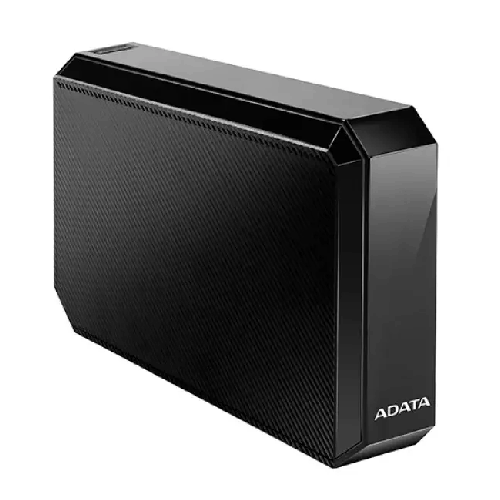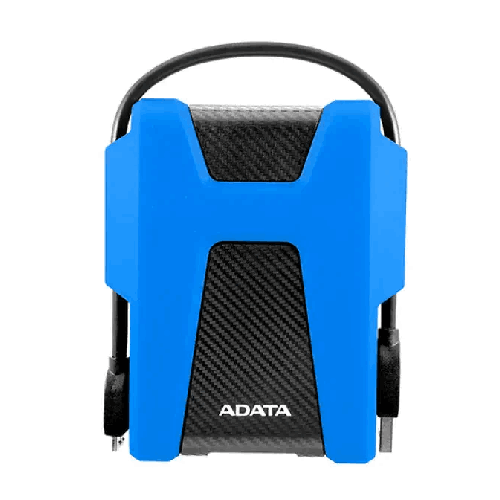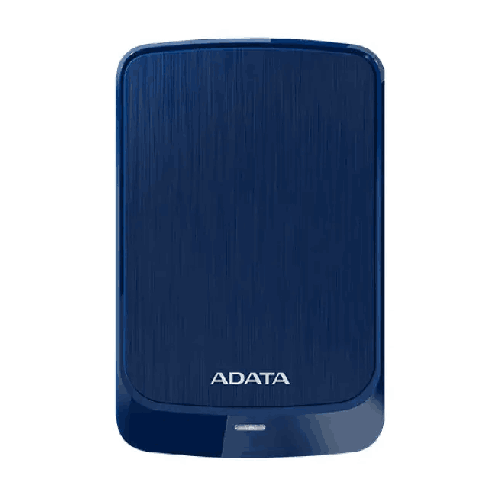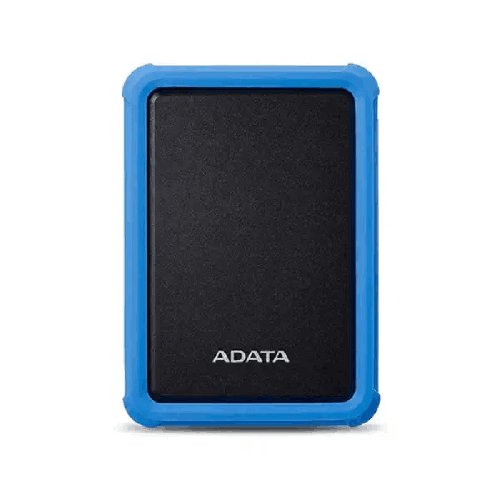

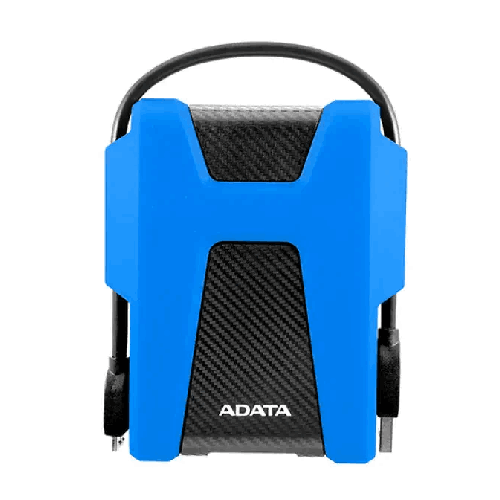
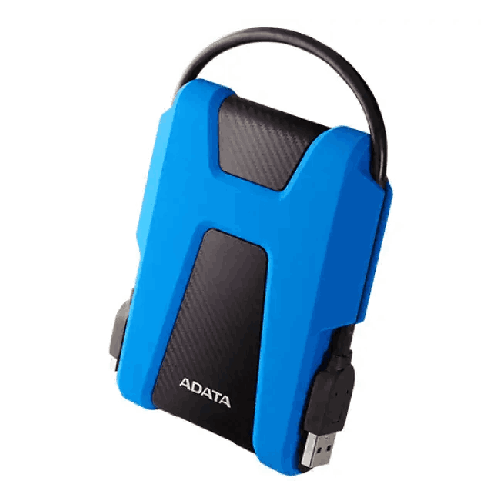
ADATA HD680 2TB USB 3.2 Military-Grade External Hard Disk Drive - Blue
Regular Price:৳19,500.00Availability: SKU: 9.63.26.9677
Quick Overview
-
Support
Saturday – Thursday: 09 AM - 06 PM. -
Payment
Cash on Delivery | Card | Online Payment -
Shipping Cost
Inside Dhaka 100tk | Outside Dhaka 150tk -
Warranty Policy
Read More
Description
ADATA HD680 2TB USB 3.2 Military-Grade External Hard Disk Drive - Blue Price in Bangladesh
The ADATA HD680 2TB is an external hard disk drive specified with 2TB of storage, a USB 3.2 Gen 1 interface and a blue exterior. The supplied information describes its external material as plastic and uses the term “Military-Grade.” A 3-year limited warranty is also listed. Together, these details provide a starting point for comparing the drive with other external storage options.
Before purchase, check that the HD680’s capacity and connection suit the computer or other device you intend to use. The supplied specifications do not state a transfer speed, USB connector type, power requirement, supported operating systems, dimensions or package contents. They also do not give a test standard or protection rating for the “Military-Grade” description. Confirm those details for the exact model rather than relying on assumptions.
Understanding the stated 2TB capacity
The ADATA HD680 has a stated capacity of 2TB. That gives you a figure to compare with the size of the files you plan to store. Documents, photos, videos, project folders and archived material can each use different amounts of storage, so consider your current data and allow for files you expect to add later.
A computer may show less usable space than the capacity printed on the drive. Formatting and the way a device calculates storage can affect how much space is reported. Check the available capacity after setup, and avoid planning to fill every available unit immediately if you expect to keep adding files.
If you are moving a collection from another device, check the total size of the folders first. If several people will contribute files, estimate the combined storage requirement and agree how those files will be arranged. Capacity is only one part of choosing an external drive; compatibility, power, file-system support and the intended workflow also matter.
USB 3.2 Gen 1 interface
USB 3.2 Gen 1 is the interface specified for the HD680. This gives you a connection detail to check against the USB ports on your computer or other intended host. The supplied product information does not identify the drive’s connector type, the included cable or the interface’s documented transfer rate.
Do not infer a particular real-world transfer speed from the interface name alone. Copying files can depend on the drive, host device, cable, file types and software. If you expect to move large collections regularly, ask for the manufacturer’s performance information for this model and check that your host device supports the relevant connection.
Confirm whether the cable required for your setup is included. The information supplied for this listing does not specify the package contents. If you plan to use the drive with more than one device, verify that each device has a compatible port or that an appropriate adapter can be used.
The “Military-Grade” description
The supplied title and material details describe the HD680 as “Military-Grade” and identify the external material as plastic. No military test standard, test conditions, certification or specific protection level was provided with those details. Treat the phrase as a supplied product descriptor, not as proof of a particular durability rating.
If you need the drive to withstand specific conditions, ask for ADATA documentation that states the relevant test or rating. The information supplied does not confirm an IP rating, water resistance, dust protection, drop height or shock rating. Do not assume the drive is waterproof, dustproof or drop-proof from the “Military-Grade” wording alone.
This distinction matters if you plan to use the drive in a demanding environment or while travelling. A general descriptor does not explain how the drive should be handled, what conditions it can tolerate or whether a particular incident is covered by the warranty. Verify any protection claim that is important to your decision.
Plastic exterior and blue colour
The external material is listed as plastic, and the product title identifies this version as blue. These details may help you recognise the model or coordinate it with other equipment. They do not, by themselves, establish the enclosure’s construction method, impact resistance or suitability for exposure to particular conditions.
The supplied specifications do not include the drive’s dimensions or weight. If you need to place it in a particular space, store it with other equipment or transport it regularly, check the manufacturer’s measurements before purchase. Also allow room for the cable and any power connection that may be required.
Colour and material are useful product-identification details, but they should not be treated as substitutes for a stated protection rating. If physical protection is important, request the official test details for the exact HD680 model.
Planning for computer and device compatibility
The supplied information does not list supported operating systems, computers, televisions, routers, game consoles or other host devices. A USB port on a device does not automatically guarantee that it supports an external drive of this capacity. Compatibility may depend on the device’s software, supported storage capacity, file system and intended use.
Before ordering, check the requirements of the computer or device you plan to connect. If you want to use the HD680 with several devices, verify that each one supports the drive and the file system you intend to use. Some devices have specific rules for formatting or reading external storage, so confirm those requirements before preparing the drive.
For a work computer, check your organisation’s policy on external storage. Some workplaces restrict the use of removable drives or require a particular handling process for work files. Confirm the applicable rules with your IT administrator before connecting a new device.
File systems and initial setup
The information supplied does not identify the HD680’s preconfigured file system or state whether any setup software is included. Check the manufacturer’s instructions before formatting the drive or changing its file system. Formatting can affect data already stored on a device, so make sure any needed files are safely copied before making changes.
If you need to use the drive across different computers or devices, confirm which file systems those devices support. The suitable format depends on your host equipment and workflow; the product information provided does not prescribe one. Do not assume that a particular file system or operating-system compatibility is guaranteed based on the model name.
After setup, check that the host device recognises the drive and reports an expected capacity. If it does not appear, follow the instructions for the exact drive and host device before changing settings. No model-specific troubleshooting steps were provided with the supplied details.
Thinking about transfer performance
No transfer-speed figure was supplied for the ADATA HD680 2TB. If transfer time matters to you, ask for the manufacturer’s documented performance information. USB 3.2 Gen 1 identifies the listed interface, but it does not, on its own, establish the speed you will achieve with your computer and files.
The number and type of files can also affect a transfer. Moving a folder containing many small files may take a different amount of time from copying a few large files. The host computer, cable, settings and other activity on the device can also influence the process. For repeated large transfers, check that the host port and cable meet the drive’s requirements.
Once files have been copied, verify that the important items are present and can be opened. This is a practical check for any storage workflow, not a special feature of the HD680.
Organising files for easier retrieval
A clear folder structure can make external storage easier to use. Before copying files to the HD680, decide whether to organise them by project, date, department or another method that suits your needs. Consistent folder names can help you locate material later, especially as a collection grows.
If several people will use the drive, agree on who can add, rename or delete files and how new folders should be named. The supplied product information does not list user accounts, access permissions or built-in file-management software. Any sharing and access controls will depend on the connected computer or other software you use.
You may also want to keep a simple record of what is stored on the drive. This can be useful for project files or records that are not accessed frequently. These are general organisation practices rather than features of the HD680; choose a method that fits your workflow and apply it consistently.
Including the drive in a backup plan
The HD680 may be used as one destination for copies of selected files, but a single drive should not automatically be treated as the only copy of important data. Consider how you would recover files if the original computer or external drive became unavailable. Decide which folders need copying, how often they should be updated and where any additional copies will be kept.
No backup application, automatic schedule, file synchronisation or recovery tool was listed in the supplied specifications. If you require one of these functions, confirm whether it is available from ADATA or through your computer’s existing software. Do not assume that the drive backs up files automatically just because it is an external storage device.
After copying files, check that the expected folders are present and that important documents open correctly. For business or institutional information, follow the relevant policies for backups, retention and access. A clear routine can help make the drive useful without relying on unverified software features.
Security and privacy considerations
Hardware encryption, password protection and security software were not specified for the ADATA HD680. If the drive will store private or business information, check whether any required protection is available through the product documentation or the computer and software you plan to use. Do not assume that “Military-Grade” material wording refers to digital encryption or data security.
For shared use, consider who can physically connect the drive and who can access its files. Follow workplace rules for confidential data and external storage. Think about how files will be backed up and how access will be removed when a drive is no longer in use. These are general planning considerations; no specific access-control function was confirmed for this model.
If a particular security feature is essential, request documentation for the exact HD680 version before purchase. A product’s material description and its digital security capabilities are different matters and should be checked separately.
Physical handling and storage
The supplied information does not state the HD680’s operating conditions, impact rating or resistance to water or dust. Follow ADATA’s instructions for handling and storing the drive, and do not expose it to conditions that the documentation does not confirm it can withstand.
If you plan to transport the drive, check whether a case or other accessory is included; none was identified in the supplied specifications. Also confirm the drive’s dimensions and weight to ensure it fits your storage or carrying arrangement. The blue plastic exterior is a stated product detail, but it does not establish a particular level of protection.
When connecting or disconnecting an external drive, use the procedure recommended for the host device. This can help avoid interrupting an active transfer. Refer to the product instructions for the exact steps rather than assuming that all devices behave the same way.
Understanding the 3-year limited warranty
A 3-year limited warranty is listed for the ADATA HD680. The supplied information does not explain the warranty’s start date, exclusions, claim process or how its terms apply in Bangladesh. Confirm the warranty documentation and local conditions for the exact unit being sold.
Warranty coverage is separate from the ability to recover data. The supplied warranty information does not say that files stored on the drive are protected or recoverable if the drive fails. Keep independent copies of important data and consider how you would restore files if one copy is unavailable.
Before ordering, ask what proof of purchase or other documentation may be needed for a warranty claim. Check which terms apply to the product offer and retain the relevant purchase documents. Do not assume that the warranty covers every type of damage or data loss unless its written terms say so.
Potential storage workflows
The ADATA HD680 2TB may be considered for adding external storage to a compatible computer, keeping selected files in one place or maintaining an additional copy of certain data. The stated capacity and USB 3.2 Gen 1 interface offer product details to compare with your storage plan.
A home user might consider an external drive for a personal file collection, while a business may evaluate it for project material or records, subject to the organisation’s policies. These are general examples, not confirmation that the drive supports a particular operating system, application or device. Check compatibility and data-handling requirements for your intended use.
If you are considering the drive for a physically demanding environment, get written information about any applicable protection standards. The title alone does not confirm a particular rating. Choose a product for the conditions it is documented to support.
A practical storage-capacity check
Before selecting a 2TB drive, calculate how much data you plan to store now and what you may add later. If you are migrating files from another drive, check the total size of the folders you want to copy. Allow room for additional content rather than planning around an exact fit.
File size varies: a collection of documents may occupy a different amount of space from a library of photos or videos. If several people will use the drive, estimate their combined storage needs and agree on a way to organise their files. The capacity printed on the product is a useful comparison figure, but the space reported by a host device may differ after formatting.
If a drive will hold selected backups, include the files that change over time in your estimate. Keeping old and new versions can use more space than storing a single current copy. Plan the folders and update routine to suit your needs.
Checks before ordering
Confirm that the product is the ADATA HD680 2TB in blue and that the interface is USB 3.2 Gen 1. Ask for the USB connector type, cable details, dimensions, weight and power requirements if they affect your setup. These details were not included in the specifications supplied.
If your purchase depends on operating-system support, a particular transfer speed, backup software or encryption, request documentation for the exact model. For the “Military-Grade” wording, ask what test standard or protection rating applies. The information supplied does not confirm an IP rating, water resistance, dust protection or drop rating.
Finally, verify the package contents and terms of the listed 3-year limited warranty with BME. Checking these points before ordering can help you choose a drive that fits your devices and workflow without assuming features or accessories that were not specified.
✅ Key Features
- 2TB storage capacity: The stated capacity gives you a figure to compare with your files and future storage needs.
- USB 3.2 Gen 1 interface: The listed connection provides a detail to check against your host device.
- External hard disk drive: The product is identified as an external HDD for use with compatible equipment.
- Blue finish: The supplied product title identifies this version as blue.
- Plastic exterior: Plastic is listed as the external material.
- “Military-Grade” descriptor: The supplied details use this wording, but do not provide a test standard or protection rating.
- 3-year limited warranty: A 3-year limited warranty is listed; confirm the terms that apply to the product sold in Bangladesh.
- Storage planning option: The stated capacity can be assessed for selected files, subject to device and file-system compatibility.
✅ Usage / Applications
The following are general external-storage uses, not confirmation of product-specific software, backup features or compatibility.
- Additional computer storage: Consider it for a compatible computer after checking the device and operating-system requirements.
- Organised file collections: Store selected files in a folder structure that fits your workflow.
- Project-file storage: Assess whether 2TB suits the files you plan to keep for a project.
- Personal data storage: Check host compatibility before using it for a personal file collection.
- Business files: Confirm your organisation’s external-storage policies before storing work material.
- File transfers: Verify that each device supports the drive and the file system before moving data between them.
- Additional file copies: It may form one part of a broader backup plan, with procedures configured separately.
- Capacity planning: Compare the stated 2TB with your current data and expected additions.
✅ Benefits of This Product?
- A stated 2TB capacity: Provides a clear figure for comparing storage needs.
- A separate storage device: Lets you assess keeping selected files outside a computer’s internal storage.
- A specified USB interface: USB 3.2 Gen 1 gives you a connection detail to check before purchase.
- Blue model identification: The colour helps distinguish this version from other products.
- Defined exterior material: Plastic is listed in the supplied specifications.
- Potential backup destination: The drive may hold an additional copy of selected files when configured as part of a separate backup routine.
- A listed warranty term: The supplied information states a 3-year limited warranty, with terms to verify.
- More informed compatibility checks: Confirming power, cable and operating-system requirements helps prevent assumptions.
✅ Ideal For
The ADATA HD680 2TB is ideal for buyers evaluating an external hard disk drive with a stated 2TB capacity and USB 3.2 Gen 1 interface. It may suit someone looking to add storage to a compatible computer, organise a collection of selected files or keep an additional copy of data as part of a broader backup plan. The blue finish and plastic exterior are also specified details for identifying this version.
Before choosing it, confirm that your computer or other intended device supports the drive, its connection and the file system you plan to use. The supplied information does not state transfer speed, operating-system compatibility, power requirements, dimensions or package contents. “Military-Grade” appears in the supplied description, but no test standard or protection rating is provided. If you need a specific level of resistance, request official documentation. The listed 3-year limited warranty should be checked for its applicable local terms.
✅ Why Choose the ADATA HD680 2TB USB 3.2 Military-Grade External Hard Disk Drive - Blue?
The ADATA HD680 2TB is worth considering if you are comparing external hard drives and want a clearly stated capacity of 2TB. Its USB 3.2 Gen 1 interface gives you a connection specification to check against the computer or other host device you intend to use. The supplied product details also identify a plastic exterior and a blue finish, helping distinguish this version from other drives.
The product title and material description use the phrase “Military-Grade.” That wording may prompt buyers to investigate its construction, but no test standard, IP rating or impact-protection figure was supplied. If your decision depends on a particular protection level, ask for official documentation for the exact HD680 model rather than assuming it is water-resistant, dustproof or drop-proof.
A 3-year limited warranty is listed, but its conditions and local terms were not included in the product information provided. Check the coverage and keep the purchase documents. Warranty coverage should not be treated as protection for data stored on the drive, so plan independent copies of important files.
Choose the HD680 when its confirmed capacity, interface and setup requirements match your needs. Verify compatibility, cable, power and package details before ordering.
✅ Why Buy This Product from BME?
Check BME’s product listing or contact BME to confirm the current price and purchase details for the ADATA HD680 2TB in Bangladesh. The supplied specifications identify the capacity, material, interface, colour and listed warranty, but several practical details may matter for your setup.
Ask for confirmation of the exact USB connector, cable and power requirements, as well as the drive’s dimensions and compatibility with your computer or other intended device. If the “Military-Grade” description is important to your decision, request information about the standard or test behind that wording. Do not assume a specific drop, dust or water-protection rating unless it is documented.
You can also confirm what is included in the package and which terms apply to the 3-year limited warranty. No cable, power accessory, software or local warranty process was specified in the details supplied. Checking these points with BME before ordering can help you plan your setup and assess the product on its confirmed specifications.
✅ Buying Guide
- Estimate your capacity needs: Check the current size of the files you intend to store and allow for future additions.
- Check your host device: Confirm that your computer or other device supports the drive’s capacity and connection.
- Verify USB details: Ask for the connector type, cable requirements and documented transfer information.
- Confirm power needs: The supplied information does not state whether an external power supply is required.
- Check operating-system support: Verify compatibility with every device you plan to use.
- Clarify the military-grade claim: Request the applicable test standard or protection rating; do not infer one from the wording.
- Plan file formatting: Check which file systems work with your devices before setting up the drive.
- Set a backup routine: Keep independent copies of important data rather than relying on one drive alone.
- Verify package contents: Ask whether cables, power accessories or software are included.
- Review warranty terms: Confirm the local conditions of the listed 3-year limited warranty with BME.
✅ Customers Ask About / Frequently Asked Questions
- Q: What is the ADATA HD680 2TB price in Bangladesh? A: The supplied information does not include a price. Check BME’s listing or contact BME for a current quote.
- Q: How much storage does the HD680 have? A: The supplied specifications list a capacity of 2TB. Usable space reported by a device may differ after formatting.
- Q: Which interface does it use? A: USB 3.2 Gen 1 is listed. The connector type and transfer rate were not supplied.
- Q: What colour is this model? A: The supplied product title identifies this version as blue.
- Q: What is the external material? A: Plastic is listed as the material, with the supplied description also using “Military-Grade.”
- Q: Does “Military-Grade” mean it is waterproof or drop-proof? A: No specific test standard or IP or drop rating was supplied. Confirm any protection claims in official documentation.
- Q: What warranty is listed? A: The supplied information states a 3-year limited warranty. Confirm the local terms with BME.
- Q: What is its transfer speed? A: No transfer-speed figure was supplied. USB 3.2 Gen 1 alone does not establish real-world speed.
- Q: Is it compatible with my computer or other device? A: Compatibility was not specified. Check the host device, operating system and file-system requirements.
- Q: Does it include a USB cable or power adapter? A: Package contents and power requirements were not supplied. Confirm them before ordering.
✅ Why Buy This Product
Consider the ADATA HD680 2TB if you are looking for an external hard disk drive with a stated 2TB capacity, USB 3.2 Gen 1 interface and blue finish. These confirmed details give you a starting point for comparing it with other storage options and checking whether it suits your intended devices.
Before purchasing, verify the USB connector, cable, power requirements, operating-system compatibility and package contents. The title uses “Military-Grade,” but no test standard or specific protection rating was supplied, so request documentation if durability is important to your use. Check the terms of the listed 3-year limited warranty as well, and keep independent copies of important data. For current product information and purchase details, contact BME before ordering.
What is the price of ADATA HD680 2TB USB 3.2 Military-Grade External Hard Disk Drive - Blue in Bangladesh?
Write a review
Question Answer
Have question about this product? Get specific details about this product from expert.