
Audac WP205/B Microphone & Line Input Wall Panel - Black
Regular Price:৳0.00Availability: SKU: 6.57.617.9665
Quick Overview
-
Support
Saturday – Thursday: 09 AM - 06 PM. -
Payment
Cash on Delivery | Card | Online Payment -
Shipping Cost
Inside Dhaka 100tk | Outside Dhaka 150tk -
Warranty Policy
Read More
Description
Audac WP205/B Microphone & Line Input Wall Panel in Bangladesh
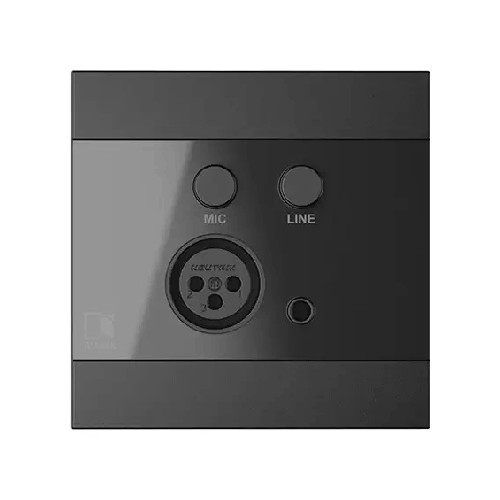
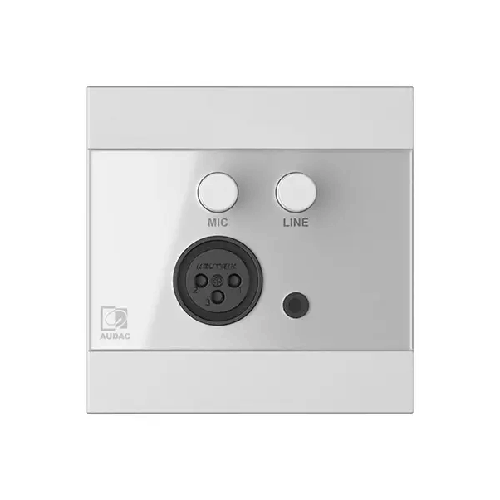
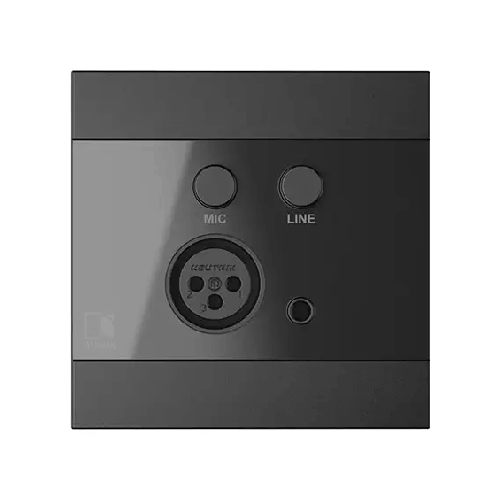
The Audac WP205/B Microphone & Line Input Wall Panel is designed primarily for use with the Audac ARES5A active speaker system, according to the supplied product information. It brings a balanced XLR microphone input and a 3.5 mm stereo line input to a wall-mounted location, with individual rotary volume controls for the two inputs. For a room where audio sources need to be connected at the wall rather than directly at the main equipment position, this layout may help make the connection point more accessible.
The WP205/B is an audio input panel, not a complete sound system. The information supplied does not describe it as a power amplifier or as a device that directly drives passive speakers. It should be considered as part of a compatible system, with the connected equipment, signal path and installation wiring checked before purchase. Its intended use with ARES5A should also be confirmed against the exact speaker system and configuration in the room.
Two input types on the front panel
The front panel provides two different input connections for audio sources. The balanced XLR connector is listed as a microphone input, while the 3.5 mm jack is specified as a stereo line input. This gives an installer two connection types to consider when planning where a microphone or line-level source will connect in the room.
A compatible microphone can be connected through the XLR input, subject to the microphone’s requirements and the panel’s configuration. For the 3.5 mm connection, use a compatible stereo line source and confirm that its output and cable arrangement suit the installation. The supplied information does not state input sensitivity, gain range, frequency response or supported signal levels, so do not assume that every device with an XLR or 3.5 mm connector will behave identically.
The presence of two inputs also does not, by itself, confirm how their signals are combined or whether both can be used simultaneously in every system configuration. The separate Mic and Line controls indicate that their levels can be adjusted independently, but confirm the intended signal behaviour and setup before relying on simultaneous use.
Individual Mic and Line volume controls
Separate rotary controls are provided on the front for microphone and line input levels. This lets an operator adjust the two input levels at the panel rather than relying only on controls at another location. In a shared room, accessible controls can be useful when different sources or speakers need different level settings.
Set each control according to the connected source and the requirements of the complete audio system. A microphone and a line-level source may have different output characteristics, so avoid setting levels solely by matching the knob positions. The supplied details do not provide calibrated level markings, a gain range or a master-volume function. For that reason, treat the controls as input-level adjustments and follow the system setup instructions when setting levels.
If several people will use the room, consider where the panel is installed and whether operators can reach it without obstructing the meeting or presentation area. Clear placement and simple instructions can help users identify which control adjusts which source.
Rear DIP switches for configuration
The rear of the panel includes DIP switches for phantom power, microphone low-cut enable or disable, and mono/stereo selection. These are configuration controls, so their settings should be checked during installation rather than changed casually by users who do not know the requirements of the connected equipment.
The phantom-power setting is relevant when selecting a compatible microphone setup. The supplied information does not state the phantom voltage or list microphone types, so check both the microphone documentation and the panel’s instructions before enabling it. Do not assume that a particular voltage is provided based only on the presence of a phantom-power switch.
The microphone low-cut switch allows the specified low-cut function to be enabled or disabled. A low-cut filter generally reduces some low-frequency content, but the cutoff frequency and response are not provided here. The appropriate setting depends on the microphone, room and intended sound. The mono/stereo switch offers a choice of operating mode, but the supplied details do not explain precisely how that setting affects each input or the connected speaker system. Confirm the required mode from the system documentation.
CAT5e or better twisted-pair cabling
The supplied specifications describe the WP205/B as transmitting audio over long distances using standard twisted-pair CAT5e or better cabling. This can be useful when the wall input and connected equipment are not close together, but the maximum supported cable length is not specified in the information provided. Confirm the permitted cable run and any installation requirements before planning a long route.
An 8-pin terminal block with a 3.81 mm pitch is listed as the rear/output connection. The terminal block’s pin assignment and wiring procedure are not included in the supplied details. Use the correct manufacturer wiring information and compatible equipment rather than guessing terminal connections.
Although CAT5e is named as the cable type, that does not establish that the panel is an Ethernet network device or that it supports Power over Ethernet. No networking or PoE function is specified here. The installation should use the cable as directed for the audio system, not assume a standard network connection or connect the panel to a network switch based on the cable category alone.
Planning the connection to an ARES5A system
The Audac WP205/B is described as being designed primarily for the ARES5A active speaker system. For buyers who already have an ARES5A setup, the panel may be a suitable input accessory to investigate when planning microphone and line connections at a wall location. Verify the exact system model, the intended connection points and any configuration requirements before purchasing.
The supplied information does not provide a complete system diagram, pinout, maximum cable length or a list of other compatible Audac products. Do not assume that the WP205/B will work with every active speaker, amplifier or third-party system simply because it uses an XLR input, a 3.5 mm jack or twisted-pair cable. If the panel is intended for a system other than the ARES5A, confirm compatibility with the manufacturer or seller.
It is also useful to plan the full signal path. Identify which source will connect to the microphone input, which will use the line input, where the connected audio is received, and how the panel’s level controls and DIP switches will be configured. This helps avoid mismatches between the room’s inputs and its sound system.
Installation and optional mounting boxes
The panel is listed at 80 × 80 mm and described as compatible with standard European in-wall boxes for solid and hollow walls. The product information also lists separate optional mounting accessories: the WB200 surface-mount box, WB45S/FS flush-mount box for solid walls, and WB45S/FG flush-mount box for hollow walls.
Choose the mounting arrangement according to the wall construction and the installation plan. Confirm which box is needed, whether it is included in the purchase, and whether the available wall cavity and cable route provide sufficient space. The supplied size does not state the panel’s depth, the required cut-out dimensions or the depth of any mounting box, so verify those measurements before preparing the wall.
A surface-mount installation may be considered where an in-wall box is not suitable, while a flush-mount option may fit a wall prepared for a recessed installation. The listed accessory names identify different options, but the exact installation method and hardware requirements should be checked against their documentation.
Black finish and front-panel materials
The WP205/B is specified in black, RAL9005. Its front-panel construction is described as ABS with an acrylic (PMMA) glass finish. This gives the panel a defined colour and material specification for buyers coordinating it with room fixtures or other equipment.
The 80 × 80 mm size is useful when checking the planned wall position, but it does not provide every dimension needed for installation. Confirm the panel depth, box dimensions, clearances and cable entry route before ordering or cutting the wall. If the panel is being installed alongside other controls or wall plates, compare their positions and finishes so operators can find the correct control easily.
Where the WP205/B may be useful
A microphone and line input panel may be considered for meeting rooms, presentation spaces, classrooms, training rooms and other locations where users need an accessible place to connect audio sources. For example, a room may need a wall-positioned microphone input for a presenter, or a stereo line input for compatible playback equipment. Whether the WP205/B suits a particular room depends on the connected system and the cable route.
In an ARES5A installation, the panel’s intended compatibility and the CAT5e-or-better cabling information may make it worth evaluating as part of the system design. Check the required cable length, terminal-block wiring and panel settings in advance. For other systems, verify compatibility rather than assuming that the connection types alone guarantee operation.
Use the controls as part of a planned setup
The two front-panel volume controls and the rear DIP switches offer different kinds of adjustment. The rotary controls provide access to Mic and Line level adjustment, while phantom power, microphone low-cut and mono/stereo selection are configured at the rear. Because the switches are located behind the panel, their settings should be decided during installation and recorded for future reference.
A clear setup process can help prevent avoidable problems. Confirm the connected microphone’s power requirements before changing the phantom setting, and check the required mono/stereo mode for the system. Start with appropriate source levels and adjust the controls while listening to the complete setup. The supplied information does not state the controls’ range or calibration, so use the system’s operating instructions when setting levels.
A practical accessory, not a standalone amplifier
The WP205/B provides front-panel audio inputs, level controls, configuration switches and an 8-pin terminal-block connection. The supplied information does not list speaker power output, amplifier ratings or speaker terminals intended for driving passive loudspeakers. It should therefore be treated as an input panel for a compatible audio arrangement rather than as a standalone amplifier.
This distinction matters when preparing an equipment list. A room may still need the appropriate active speaker system or amplification, source equipment, cables and installation accessories. The panel also does not eliminate the need to confirm microphone compatibility, line-source levels, cable wiring or the correct wall box.
What to verify before ordering
Before buying the Audac WP205/B, confirm that it is intended for the exact speaker system in your room, especially if you are not using an ARES5A. Ask for the complete wiring diagram and terminal-block pinout, the maximum supported cable run and the required cabling arrangement. Confirm how the mono/stereo DIP setting interacts with the connected system and whether both input sources can be used in the way you require.
Also confirm whether the selected wall box is included or must be purchased separately. The supplied optional accessories are WB200, WB45S/FS and WB45S/FG. Check which one matches the wall construction and whether it provides adequate space for the panel and cable connections.
Finally, verify the current product price, availability and applicable purchase terms with BME. No warranty period or package contents were provided with the supplied specifications, so check those details rather than assuming that a mounting box, cable or other accessory is included.
✅ Key Features
- ARES5A-oriented compatibility: The panel is described as designed primarily for the Audac ARES5A active speaker system.
- Balanced microphone input: A front-panel balanced XLR connector is specified for a microphone input.
- Stereo line input: A front-panel 3.5 mm jack is listed for stereo line-level audio.
- Independent input controls: Separate rotary controls are provided for Mic and Line levels.
- Configurable microphone settings: Rear DIP switches provide phantom-power and microphone low-cut settings.
- Mono/stereo selection: A rear DIP switch is listed for selecting mono or stereo operation.
- Twisted-pair cabling: The supplied information specifies CAT5e or better twisted-pair cable for audio transmission.
- 8-pin terminal output: The rear connection is an 8-pin terminal block with 3.81 mm pitch.
- European in-wall box compatibility: The 80 × 80 mm panel is described as compatible with standard EU in-wall boxes for solid and hollow walls.
- Black RAL9005 finish: The panel is specified in black with an ABS front panel and acrylic (PMMA) glass finish.
✅ Usage / Applications
- ARES5A installations: Consider the panel as an input accessory for a compatible Audac ARES5A system.
- Meeting rooms: Provide a wall-positioned point for a compatible microphone or stereo line source.
- Presentation areas: Give presenters access to the listed XLR microphone and 3.5 mm line inputs.
- Classrooms: Evaluate it for compatible audio systems where a wall input is useful for lessons or presentations.
- Training rooms: Place the panel where instructors can connect a suitable microphone or audio source.
- Conference spaces: Assess it as part of a wider system plan for connected microphone and line inputs.
- Installations with longer cable routes: Check the CAT5e-or-better twisted-pair requirement and confirm the permitted run length.
- Solid or hollow wall projects: Choose a suitable mounting option after checking the wall type and box dimensions.
✅ Benefits of This Product?
- Accessible connection point: Wall mounting can place audio inputs where users need to connect sources.
- Choice of source connection: A balanced XLR microphone input and 3.5 mm stereo line input are provided.
- Separate level adjustment: Individual Mic and Line controls let users adjust the two input levels at the panel.
- Installation configuration options: Rear DIP switches provide settings for phantom power, mic low-cut and mono/stereo mode.
- System-oriented cabling: CAT5e or better twisted-pair cabling is specified for audio transmission.
- Defined terminal connection: The 8-pin, 3.81 mm-pitch output provides a specified connection type for system wiring.
- Multiple mounting approaches: Listed optional boxes cover surface, solid-wall flush and hollow-wall flush installation choices.
- Coordinated finish: The black RAL9005 finish can suit installations with other dark equipment or room fittings.
✅ Ideal For
The Audac WP205/B is ideal for system designers and installers evaluating a wall-mounted microphone and line input for an Audac ARES5A active speaker setup. It may suit meeting rooms, classrooms, presentation spaces and training areas where users need an accessible input point rather than connecting sources directly at the main equipment location. Its balanced XLR microphone input and 3.5 mm stereo line input provide two connection types to consider, while the separate Mic and Line controls allow level adjustment at the panel.
The rear DIP switches may also be useful when the installation requires the listed phantom-power, microphone low-cut or mono/stereo settings. The right setup depends on the connected microphone and audio system, so confirm the required settings and wiring before installation. Buyers should check cable length, terminal-block pinout, wall-box dimensions and whether an optional mounting box is needed. For use with systems other than ARES5A, verify compatibility instead of assuming that matching connectors are sufficient.
✅ Why Choose the Audac WP205/B Microphone & Line Input Wall Panel - Black?
The Audac WP205/B is worth considering when a compatible audio system needs microphone and line inputs at a wall location. Its front panel includes a balanced XLR microphone input and a 3.5 mm stereo line input, along with separate rotary controls for Mic and Line. This gives the room user a defined place to connect and adjust the listed input sources.
The rear DIP switches provide settings for phantom power, microphone low-cut and mono/stereo selection. These features give an installer several configuration points to check when planning the system, although the correct settings depend on the connected microphone and speaker arrangement. The supplied information does not specify phantom voltage, filter cutoff or the full behaviour of the mono/stereo setting, so those details should be confirmed.
The panel is described as designed primarily for the ARES5A active speaker system and as using CAT5e or better twisted-pair cable for audio transmission. An 8-pin terminal block output is specified, so installers should obtain the correct pinout and wiring instructions before connecting it. The listed 80 × 80 mm size and optional mounting boxes provide a starting point for considering surface or flush installation.
Choose the WP205/B when its compatibility and connection requirements match your system—not simply because it has familiar connector types. Confirm the cable run, box choice and purchase terms before ordering.
✅ Why Buy This Product from BME?
BME’s product listing or sales contact is a place to check the Audac WP205/B’s current price and purchase details in Bangladesh. Because the specifications supplied do not include a wiring diagram, supported cable length, package contents or warranty terms, it is sensible to confirm these points before ordering.
When contacting BME, identify the system the panel will connect to, including whether it is an Audac ARES5A setup. Ask for confirmation of compatibility with the exact installed equipment and request the correct terminal-block wiring information. If a long cable route is planned, check the permitted run length and any installation requirements rather than relying only on the general CAT5e-or-better statement.
Also confirm which mounting box suits the wall: the WB200 surface box, WB45S/FS solid-wall flush box or WB45S/FG hollow-wall flush box. Ask whether the selected accessory is included or sold separately, and verify the panel’s dimensions and installation clearances. Check the applicable warranty and other purchase terms with BME, as no warranty information was supplied here. These questions help you assess fit before purchase without assuming unlisted services or inclusions.
✅ Buying Guide
- Confirm the system: Check that the WP205/B is compatible with the exact audio system; the supplied information identifies ARES5A as its primary intended system.
- Identify each source: Decide what will connect to the balanced XLR microphone input and the 3.5 mm stereo line input.
- Check microphone requirements: Confirm microphone compatibility and whether it needs phantom power before setting the rear DIP switch.
- Plan the operating mode: Verify whether mono or stereo is required and how the selected mode behaves in the connected system.
- Confirm the wiring: Obtain the terminal-block pinout and installation instructions; do not guess the 8-pin connections.
- Measure the cable route: Check the supported length and requirements for the CAT5e-or-better twisted-pair cable; a maximum distance was not supplied.
- Choose a wall box: Select WB200, WB45S/FS or WB45S/FG according to the installation and wall construction, and confirm whether it is included.
- Check wall clearances: Verify box depth, cut-out and cable access before preparing the wall.
- Confirm what is supplied: Ask whether any cables, boxes or other accessories are included.
- Check purchase terms: Confirm current pricing, availability and applicable warranty terms with BME.
✅ Customers Ask About / Frequently Asked Questions
- Q: What is the Audac WP205/B price in Bangladesh? A: The supplied details do not include a price. Check BME’s listing or contact BME for a current quote.
- Q: Which system is the WP205/B designed for? A: The supplied information describes it as designed primarily for the Audac ARES5A active speaker system.
- Q: What inputs does the panel have? A: It has a balanced XLR microphone input and a 3.5 mm stereo line input.
- Q: Does it have separate input controls? A: Yes, individual rotary volume controls for Mic and Line are listed on the front.
- Q: What do the rear DIP switches control? A: The listed settings are phantom power, microphone low-cut enable/disable and mono/stereo selection.
- Q: Does the panel use CAT5e cable? A: The supplied information specifies CAT5e or better twisted-pair cabling for audio transmission. Confirm the wiring and maximum run length for your system.
- Q: Is the connection Ethernet or PoE? A: Ethernet networking and PoE are not specified. Do not assume that the CAT5e cable reference means the panel is a network or PoE device.
- Q: Which mounting boxes are available? A: The listed options are WB200 for surface mounting, WB45S/FS for solid-wall flush mounting and WB45S/FG for hollow-wall flush mounting.
- Q: Are the mounting boxes included? A: They are listed as optional accessories. Confirm the exact package contents with BME.
- Q: What warranty does the WP205/B have? A: No warranty period was provided in the supplied specifications. Confirm the applicable terms with BME.
✅ Why Buy This Product
Consider the Audac WP205/B when your compatible audio system needs a wall-mounted point for a microphone and stereo line source. It combines a balanced XLR mic input, a 3.5 mm stereo line input and separate front-panel level controls, with rear DIP switches for the listed phantom-power, mic low-cut and mono/stereo settings.
The supplied information identifies the ARES5A active speaker system as the panel’s primary intended use and specifies CAT5e or better twisted-pair cable for audio transmission. Its 80 × 80 mm size and optional surface or flush-mount boxes give installers several details to check when planning the wall position. Before choosing it, verify system compatibility, terminal-block wiring, maximum cable length and the correct box for the wall construction. For current purchase information and to confirm the panel suits your installation, contact BME.
What is the price of Audac WP205/B Microphone & Line Input Wall Panel - Black in Bangladesh?
Write a review
Question Answer
Have question about this product? Get specific details about this product from expert.